
 Best Platforms
 Live Odds








Predara vs. MarketsPrediction: Which Is Better for Prediction Market Analysis?
A head-to-head comparison that settles whether Predara or MarketsPrediction fits your day-to-day definition of “prediction market analysis” — predara.org disambiguation, discovery vs diligence, data-trust and matching/staleness failure modes, decision-changing features (Top Markets By Volume and platform stats vs executable-cost framing and settlement checks), and a step-by-step decision guide so you can pick the right tool (or use both) with confidence.
You’ve found a market you care about and you’re trying to decide where to do your analysis: do you start by scanning what’s moving, or by interrogating the exact contract you plan to trade? If you pick the wrong tool for the job, you can waste time chasing dead liquidity, misread a price that isn’t actually executable, or miss a settlement detail that changes the bet.
This comparison separates those two jobs, clears up common “Predara” search-result confusion (this is about predara.org), and then walks through data trust, failure modes, and the features that actually change decisions—ending with a simple choose-this/choose-that guide, plus when using both makes sense.
Avoid Predara mix-ups
If you’re comparing tools from a Google SERP (search engine results page), “Predara” is easy to misread because multiple similarly named products show up and the domain matters.
Predara.org defined
In this article, “Predara” means the prediction-market analyzer at Predara.org, not other products with the same or similar name.
Predara’s core workflow is link-in, analysis-out: it prompts you to paste a market URL from Kalshi, Polymarket, Gemini, or Coinbase, and it can compare up to three market URLs side-by-side. It also positions itself as read-only (“No account, wallet connection, or trade execution.”), so you’re using it for diligence, not routing orders.
When you see Predara described as producing a “decision-ready brief,” this is what it’s pointing at: output based on venue APIs, order books, and official contract terms, plus a Settlement Desk that checks a venue’s reported result against the contract and public settlement data (usually straight from the platform’s API).
One-line tool map
Use this as a quick “which Predara?” filter:
- MarketsPrediction: cross-platform discovery—browse top markets, compare activity across venues, and remember that its Terms explicitly warn matched markets and derived comparisons can be wrong (matching errors, stale data, or different resolution criteria).
- Predara (predara.org): paste a specific market link (or ticker after close) to get a contract-focused brief and post-close settlement verification.
If you already have a market URL in hand, you’re usually in Predara territory; if you don’t, you’re usually still screening.
Discovery vs diligence
The word “analysis” hides two different jobs. One is finding what to look at. The other is deciding whether a specific contract is actually the bet you think it is.
Job 1: discovery
Discovery is cross-platform scanning: you browse what’s active, filter by category/venue, and price-shop before you ever commit to a trade. This is where an aggregator like MarketsPrediction earns its keep by pulling together publicly available odds/prices, volume, liquidity, and market metadata across third-party platforms.
The fragile part is cross-platform matching—automatically identifying that two listings on different venues are “the same bet.” Matching can fail when the contracts look similar but differ in the thing that decides the payout: settlement / resolution criteria—the exact rules and sources that determine whether the contract resolves Yes or No. If the resolution criteria or wording drift, “same headline” is not the same position, and any derived cross-venue comparison is built on a bad premise.
Job 2: diligence
Diligence is contract-by-contract work: read the rules, verify the settlement wording, and check what would actually cause a payout. This is where Predara is strongest, because its Settlement Desk is explicitly about verifying a venue’s reported result against the contract and public settlement data, with most confirmations coming straight from the platform’s API.
Self-test: Do you already have a specific market link to evaluate? If yes, you’re past discovery and into diligence: you need to validate settlement criteria and edge on that exact contract. If no, you’re still screening: optimize for breadth and speed first.
One practical constraint: Predara’s link-in workflow only supports certain venues (Kalshi, Polymarket, Gemini, Coinbase), and its public pricing details aren’t published—so diligence may start with “is this even a supported link?” before anything else.
Data trust & failure modes
-
If you’re using an aggregator view, assume the fragile step is the mapping. MarketsPrediction describes itself as an independent comparison/analytics site that aggregates publicly available odds/prices, volume, liquidity, and market metadata from third-party platforms—and its Terms explicitly warn that matched markets and derived comparisons can be wrong, so you should verify on the underlying venue before trading. That kind of explicit caveat is often a good sign in an aggregator: it’s optimized for fast cross-venue scanning and price/volume comparison, not as a source of truth for contract wording.
-
What breaks: cross-platform matching, stale refreshes, or “same headline, different settlement wording.”
-
Practical tell: the site exposes a “Last updated” timestamp. If it isn’t recent enough for the decision you’re making, treat the page as informational and re-check the market directly on the venue before trading.
-
If you’re using Predara, the trust boundary is usually narrower—but you inherit venue-API quirks. Predara’s Gemini Monitor page says every figure is computed from Gemini’s public Prediction Markets API endpoints (/events and /volume), and it lists a key limitation: no depth (top-of-book only, no sizes).
-
What breaks: “looks liquid” when the best price is real but the size behind it is unknown.
-
Know the data’s shape: Gemini’s /v1/prediction-markets/volume/{date} endpoint is public/unauthenticated and returns category volume for one completed UTC day (with prediction-market volume beginning at 2025-12-15).
-
AI-assisted settlement checks add a different failure mode: key handling and reproducibility. Predara’s Settlement Desk says that when AI is needed it calls Anthropic using your API key (Predara has no key of its own), and that the key is stored only in your browser’s localStorage—not logged or saved server-side.
-
Before you trade or share a screenshot, run this quick verification checklist:
-
Open the market on the venue and confirm you’re looking at the same contract (title alone isn’t enough).
-
Re-check Liquidity—how costly it is to enter/exit at size without moving price—via bid-ask spread, available size near the price, and expected slippage as you scale.
-
Sanity-check Calibration—whether contracts priced at X% resolve true about X% of the time—before repeating “price = probability” as a claim; calibration can vary by domain, horizon, and platform.
-
If the view depends on “Last updated,” make sure it’s recent enough for what you’re about to do.
-
If you’re citing volume history from Gemini endpoints, remember the documented coverage start date and UTC-day framing.
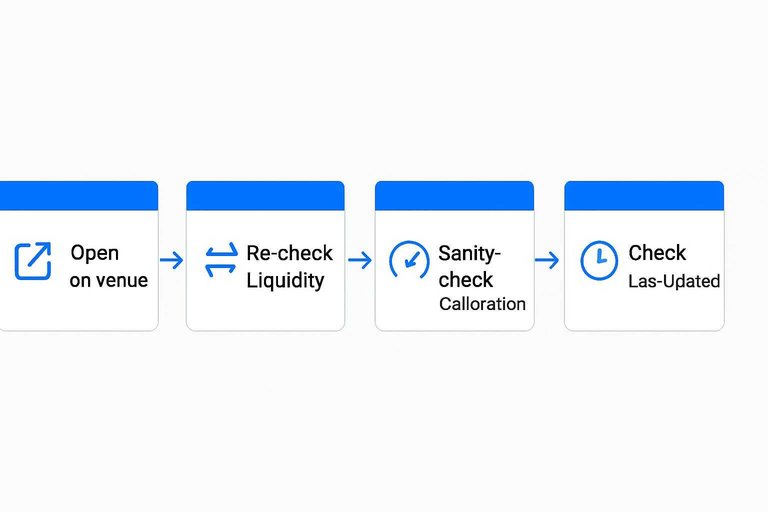
Operational checklist: verify the match, freshness, and resolution criteria before you act
If you’re using an aggregator page as your starting point, treat matching + staleness + resolution-criteria drift as three separate checks. This takes 2–3 minutes and catches the exact failure modes MarketsPrediction warns about in its Terms.
-
1) Confirm you’re mapped to the same contract (not just the same headline)
-
Click through to the underlying venue listing(s) and compare the unique market identifier the venue uses (e.g., event/market ID or the canonical market URL), not an aggregator-generated title.
-
If the aggregator shows multiple venues “for the same market,” open each venue in a new tab and verify you’re looking at the same underlying question, not a similarly worded sibling market.
-
2) Verify the timestamp is usable for your decision
-
Note the aggregator page’s “Last updated” value.
-
If you’re about to trade, refresh the venue page and confirm the venue’s current displayed price/odds still match what you saw on the aggregator.
-
3) Compare resolution criteria line-by-line on the venue page
-
On the venue, open the contract’s rules / settlement / resolution criteria section and read it end-to-end.
-
Specifically check for:
-
Source of truth: what data source or authority is used.
-
Time window: the exact cutoff time/date/timezone.
-
Definition details: terms that look interchangeable (“wins,” “approved,” “official,” “launch,” “released”) but can pay out differently.
-
Edge cases: cancellations, postponements, partial completions, recounts/corrections, or “official after review” language.
-
If two venues differ on any of the above, treat the aggregator “match” as informational only and stop treating the prices as directly comparable.
-
4) Reconcile “Yes/No” orientation and what the price represents
-
On each venue, confirm which side is Yes and which is No, and that you’re reading the same side across tabs.
-
If the venue uses implied odds, probability-style pricing, or a different quoting convention, anchor your comparison to the venue’s own trade UI.
-
5) Document what you verified before you trade or share
-
Save the venue link(s) you verified and note the aggregator’s “Last updated” time you relied on.
-
If you’re posting a screenshot, prefer screenshots from the venue’s contract page (where the resolution criteria are visible) rather than the aggregator view.
Features that change decisions
Choosing between these tools becomes straightforward once you decide which job you’re doing first: cross-platform discovery, or contract-and-settlement diligence on a specific market.
If you’re still screening across venues, MarketsPrediction is built for breadth (what’s hot, where activity is, and which venue looks “most alive”). If you already have a specific contract in mind, Predara is built for diligence—especially executable cost (the trade you can actually get filled at—ask, spread, fees—not a midpoint or headline percent) and settlement verification.
| Decision-critical capability | Cross-platform screener/aggregator | Predara | Winner (why it changes decisions) |
|---|---|---|---|
| Cross-venue “Top Markets” discovery | “Top markets” lists across venues | Link-in analysis per market URL | Screener: faster candidate selection |
| Platform-level macro stats for venue choice | Platform dashboards (volume/liquidity) | Per-contract, per-venue brief | Screener: pick venue before deep dive |
| Concrete tradability framing | Emphasizes volume/liquidity signals | Puts executable cost front-and-center | Predara: avoids non-tradable “good prices” |
| Contract settlement diligence (post-close) | Not contract-resolution focused | Settlement Desk checks platform API settlement | Predara: reduces wrong-resolution risk |
| AI help for ambiguous settlement questions | Not part of the workflow | Optional Anthropic key for AI calls | Predara: AI only when needed, user-owned key |
Two details matter in practice:
- The screener’s platform table can be genuinely outcome-relevant when it’s time to choose where to trade. One visible snapshot, for example, shows Polymarket Volume (24 h) at $54,371,096 and Total Liquidity at $292,685,074—exactly the kind of macro view you use before you ever open a specific contract.
- Once you’re past venue selection, “big volume” stops being a sufficient shortcut. The common trap is treating volume as market quality, even though tradability is ultimately about what you can execute at (spread/price impact), not the headline activity number.
Operational constraints to keep in mind: the aggregator’s Terms explicitly restrict scraping and redistribution for competing datasets/products, and Predara has no verified public API documentation—so neither is a clean “pipe it into my internal system” answer by default.
Where Predara wins
Predara (https://www.predara.org/ rel=“nofollow”) is the better choice when your risk is “I might be analyzing the wrong contract or the wrong settlement,” not “I need the hottest list across venues” (the job MarketsPrediction optimizes for).
-
Pre-trade contract diligence on a specific link. Paste the market URL and treat the output as a “can I actually trade this?” check: executable cost framing, contract terms, and venue-specific mechanics in one pass.
-
Choosing between near-duplicates you already found. If you have 2–3 candidate markets open, the side-by-side compare workflow is built for picking the one with cleaner wording and more realistic execution.
-
Post-close settlement auditing. The Settlement Desk is purpose-built for “did this resolve correctly?” work using the platform’s own settlement data, which is what you want before you cite a result or challenge one.
-
When settlement gets interpretive. You can run AI help using your Anthropic API key (from console.anthropic.com), so the analysis is tied to your account rather than a shared site key.
-
Keyboard-driven, repeatable checks. Built-in shortcuts (refresh, save/bookmark, export, help) are small, but they matter when you’re doing diligence repeatedly.
Limitations that matter: pricing isn’t publicly listed (and there’s no verified free tier); coverage is limited to Kalshi/Polymarket/Gemini/Coinbase; Gemini data is top-of-book only (no depth); and there’s no verified public API documentation for Predara itself, so it’s not a clean integration target.
Decision guide
- Choose the screener if your first question is “what’s worth looking at right now?”
- Use it when you need cross-platform browsing (top markets, filters by platform/category, quick venue comparison).
- Its own homepage frames the scale as 13.7M active markets, which is exactly the kind of “start wide” situation where a screener saves time.
- Practical limitation: don’t treat it like a dataset you can bulk-export—its Terms forbid scraping/crawling and redistributing the site’s comparisons to feed a competing product.
- Choose Predara if you already have a specific, supported market link and you’re trying to avoid a “wrong contract / wrong settlement” mistake.
- Paste the URL into https://www.predara.org/ (rel=“nofollow”) and use the brief to sanity-check what you can actually execute, then use side-by-side compare if you’re deciding between near-duplicates.
- Real limitations: pricing isn’t publicly listed; coverage is limited to Kalshi/Polymarket/Gemini/Coinbase; and there’s no verified public API documentation for Predara itself.
- Use both when you want speed and diligence (recommended workflow)
- Screen: find candidates on MarketsPrediction.
- Confirm: open the candidate directly on the venue, then copy the exact market URL.
- Deep-check: paste into Predara; compare 2–3 URLs if needed.
- After close: use Settlement Desk to verify the reported result against platform settlement data.
That workflow keeps discovery fast, but makes your final decision contract-specific.
Start wide, then validate narrow
If you’re deciding where to begin, start with MarketsPrediction when you’re still asking “what’s moving, where is activity, and which venue is worth opening?”—it’s built for fast cross-platform discovery, not for being the final authority on contract wording. The moment you have a specific contract you might trade, switch jobs: open it on the venue to confirm it’s the exact market you intend, then use Predara for contract-and-settlement diligence on that supported link (including post-close checks) at https://www.predara.org/ (rel=“nofollow”). That split—discovery first, diligence second—is how you avoid the two costly errors this comparison kept circling: trusting a mismatched cross-venue “same bet,” or missing a settlement detail that changes what you actually bought.
Frequently Asked Questions
- Is a prediction market price the same thing as a true probability (for example, 70¢ = 70%) when doing prediction market analysis?
- Not exactly—treat the displayed price as the market’s implied probability, then sanity-check calibration before you repeat it as a literal probability claim. Calibration can shift by topic, time horizon, and platform, so the same “70%” can behave differently across markets.
- If MarketsPrediction shows two markets are matched across platforms, is it safe to trade without opening the underlying venue?
- No—verify on the underlying venue before trading because automated matching and derived comparisons can be wrong due to stale data or different resolution criteria. Use the aggregator view for fast scanning, then confirm contract wording and settlement rules on the market’s source platform.
- What should I look at besides volume when comparing market quality across platforms?
- Check tradability: bid-ask spread, depth/available size near the price, and expected slippage as you scale, because volume alone can reflect turnover rather than executable liquidity. Use volume to find activity, but use execution metrics to decide whether a price is actually tradeable.
- Can I use the Polymarket Gamma API instead of an aggregator for prediction market analysis?
- Yes—use the Polymarket Gamma API when your analysis is Polymarket-only and you want data direct from that ecosystem. Use an aggregator when your first job is cross-platform discovery and price-shopping across multiple venues.
- How do I size bets from prediction market prices—should I use the Kelly Criterion?
- You can use the Kelly Criterion if you have your own probability estimate and an edge versus the market price; without an independent forecast, Kelly has nothing to optimize. If you do use Kelly, consider fractional Kelly to reduce drawdowns from estimation error.