
 Best Platforms
 Live Odds







Omnipred vs. MarketsPrediction for Polymarket and Kalshi Odds
OmniPred vs. MarketsPrediction for Polymarket and Kalshi odds: when to use fast arb alerts vs trade validation (matching, bid/ask, spreads, fees, freshness).
You’re watching the same question trade in two places and trying to decide where to put your next order—or whether a cross-venue gap is worth hitting right now. Get it wrong and you don’t just miss an edge: you can trade the wrong contract, pay away the spread, or discover that fees and fill reality erase what looked like “free money.”
This comparison shows how to pick your job first (alerts vs validation), how to match markets before you trade, and how to run a quick tradeable-price check so you know what you’re buying is the same bet at a price you can actually get.
Pick your job
Before you compare “Polymarket vs Kalshi odds,” decide what you’re doing all day: reacting to gaps, validating a trade you already want, or browsing for what’s even worth attention.
Also keep the venue context straight. Kalshi is a Designated Contract Market (DCM)—a CFTC designation for an exchange permitted to list and trade certain derivatives products in the U.S.—and the CFTC issued Kalshi an Order of Designation on November 4, 2020.
For this article, “actionable odds” means three things are true at once:
- you’re looking at the same real-world question with the same resolution criteria, 2) the price shown is an executable quote you can actually trade, and 3) you know how fresh that quote is (a timestamp or an explicit scan cadence). If any one is missing, you don’t have a trading signal—you have a screenshot.
Alert-first arbing
You pick this job when your edge is reacting first to a Polymarket↔Kalshi gap—even if you still have to do the verification work yourself.
- You want a scanner that matches Polymarket and Kalshi markets for you (OmniPred describes an “AI matcher”).
- You want it to compare the current ask on each venue and surface the percentage-point gap, not make you hunt manually.
- You want push delivery: OmniPred’s Telegram bot (@odds_arbbot) scans every 10 minutes, uses a ≥2% threshold, and sends “Top 5 by profit” each cycle.
- You accept that alerts are a starting gun, not proof: you still have to verify the match and whether you can actually get filled at those prices.
If your edge is “I saw it first,” alerting is the product—and everything else is your checklist.
Validation-first shopping
You pick this job when the constraint is whether the two venues are actually comparable—resolution criteria, executable quotes, and a clear freshness signal.
- You start by assuming the tools can be wrong: MarketsPrediction explicitly warns that matching errors, stale data, and materially different resolution criteria can break cross-platform comparisons.
- You insist on a freshness signal before you size anything; MarketsPrediction surfaces a “Last updated” timestamp (for example: September 17, 2026 at 5:11 AM UTC).
- You treat “best price” as “best executable price,” not a single displayed percent.
This mindset feels slower, but it’s what keeps a tempting gap from turning into two unrelated bets.
Match before you trade
A matched event is a cross-platform mapping that claims two separate venue listings are the same underlying real-world question. An outcome pair is the specific YES/NO (or named) outcome on each venue that the matcher treats as equivalent.
Before you treat a displayed gap as tradable, verify the match yourself:
- Read the resolution criteria on both venues (not just the title). Confirm the exact wording that decides the win, plus any “according to…” source, cutoffs, and excluded edge cases.
- Confirm the outcome mapping is truly equivalent. “YES” must mean the same thing on both sides, and “NO” must be the logical complement of that same statement.
- Check the resolution timing matches. If one contract resolves at a specific timestamp and the other at a different timestamp or after an additional condition, your “same event” assumption is already broken.
- Normalize price and payout conventions. Polymarket shares trade between 0.00 and 1.00 and winning shares pay out $1.00 USDC; Kalshi contracts settle to $1 if right and $0 otherwise, and prices range from $0.01 to $0.99. Make sure you’re comparing like-for-like.
- Treat “arb rules” as conditional on correct pairing. A scanner can flag “risk-free” when YES on one venue plus NO on the other costs less than $1—but that only holds if the outcome pair really resolves opposite ways.
One practical note: MarketsPrediction doesn’t execute trades or hold funds, so matching is never “done” until you’ve opened the actual venue listings and checked the resolution text yourself.
Tradeable price check
Displayed “odds” only matter if you can actually hit them. The fastest way to sanity-check that is to treat every comparison like a mini execution report—and to lean on views that expose executable quotes (not just implied probabilities), the way a cross-platform scanner like MarketsPrediction tries to do.
-
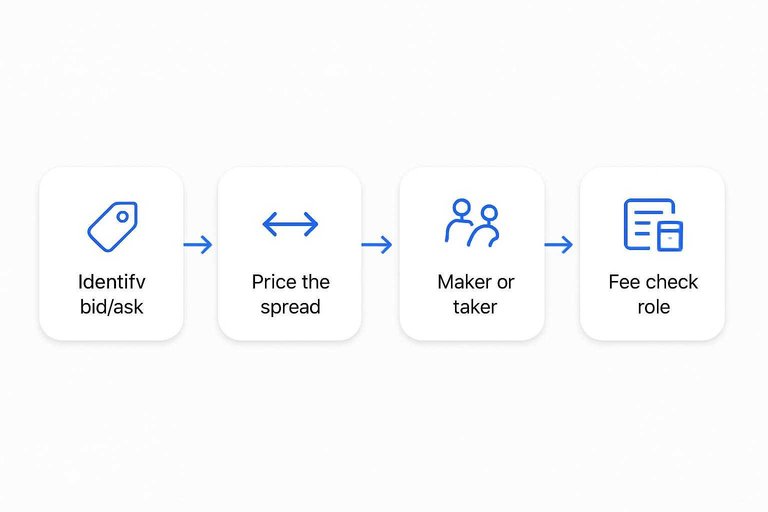
Identify the executable side you need. The bid is the best current price you can sell at; the ask is the best current price you can buy at. If your plan is “buy here, sell there,” you need the ask on entry and the bid on exit—anything else is marketing.
-
Price the spread before you price the gap. The spread is ask minus bid; it’s the immediate cost of entering and exiting quickly. If a page can show “Best Spread: Kalshi 4¢” alongside per-outcome “Buy Yes” / “Buy No” quotes, that’s closer to tradeable than a single percent because it exposes the cost of crossing the market.
-
Classify yourself as maker or taker. A maker posts a resting order; a taker removes liquidity by filling an existing order. This matters because fee treatment can be different by role.
-
Fee-check the role you’ll actually be. Polymarket states makers are never charged fees (only takers pay). Kalshi publishes separate maker and taker fee formulas, with different coefficients (0.0175 for maker vs 0.07 for taker) applied to the same core term.
-
Only trust a displayed gap when all three are visible: same contract definition, executable bid/ask (not one number), and a freshness signal (e.g., a “Last updated” timestamp). Otherwise, it’s a screenshot—not a price.
When “risk-free” breaks
OmniPred’s “risk-free arbitrage” rule is clean: if buying YES on one venue plus buying NO on the other costs less than $1, it flags an opportunity. The two places it breaks are boring—and they’re exactly where small “edges” go to die.
First breakpoint: fee drag. Polymarket’s published taker-fee math is Fee = C × feeRate × p × (1 − p)—where C is the number of shares, feeRate is the market’s category rate, and p is the trade price (0–1). In Politics, that feeRate is 0.04. Kalshi’s fee schedule applies the same p(1−p) core term but multiplies it by 0.07 for takers (or 0.0175 for makers) and then rounds the fee up. That rounding is the cliff: the “tiny gap” you saw can vanish even if prices still look favorable.
Second breakpoint: contract mismatch. MarketsPrediction’s Terms explicitly call out that matching errors and materially different resolution criteria can break cross-platform comparisons—so your “YES here + NO there” may not be opposites.
Quick check before you act: verify the resolution text is truly complementary; price using executable quotes and the spread (one event page even shows “Best Spread: Kalshi 4¢”); then compute fees for the role you’ll actually be taking.
Fee-adjusted execution checklist (before you click buy)
Use this as a fast “does YES+NO < $1 actually survive trading?” test. Don’t use the displayed mid or last trade—use the prices you can take right now.
- Confirm the contracts are true opposites (resolution audit)
- Open both event pages and read the full resolution language.
- Verify they refer to the same real-world condition (same measurement, deadline/cutoff, and source/authority).
- Check that one side’s outcome you plan to buy is exactly the complement of the other side’s outcome (no extra clauses like “official results,” “as of,” “first announcement,” etc.).
- Price it using executable quotes (taker reality)
- Record the ask for the contract you’ll buy on each venue (YES on one, NO on the other). That’s your real entry cost.
- Note the spread on each leg. If you need the ability to exit before resolution, assume you’ll cross the spread again.
- Compute fees for the role you’re actually taking
- If you’re filling existing orders, price it as a taker on both legs.
- Polymarket: fee is charged at match time and follows Fee = C × feeRate × p × (1 − p) (Politics uses feeRate 0.04).
- Kalshi: the schedule uses the same p(1−p) core term, applies 0.07 for takers (or 0.0175 for makers), and rounds the fee up. Treat that rounding as a hard minimum that can erase “1–2¢” gaps.
- Convert the headline arb into a fee-adjusted break-even
- Start with: GrossCost = Ask(YES_leg) + Ask(NO_leg).
- Then add: NetCost = GrossCost + Fees(YES_leg) + Fees(NO_leg).
- Only treat it as a real cross-venue arb candidate if NetCost < 1.00 after rounding and at the share size you intend to trade.
- Re-check the quote’s freshness before placing the second leg
- If your tool’s data is timestamped, confirm it’s current.
- If not, refresh each venue’s order book and re-run steps (2)–(4) immediately before you place the second order—stale “asks” are the easiest way for a paper arb to disappear.
- Resolution and settlement mechanics sanity check
- Confirm both venues are standard $1-to-win / $0-to-lose contracts (YES/NO pairs are collateralized to $1).
- If either market has unusual settlement language, don’t treat it as interchangeable with the other leg—even if the labels look aligned.
OmniPred: fast alerts
OmniPred is built for speed: it matches Polymarket and Kalshi listings (it describes an “AI matcher”), compares the current ask prices across the two venues, and then pushes the biggest gaps to you instead of making you hunt.
On the site’s live snapshot, OmniPred shows the scale of that scan: 15,653 markets tracked, 1,326 matched events, and 1,992 arbitrage opportunities at the moment the snapshot was taken. The alerting layer is the point. Its Telegram bot scans on a fixed cadence (every 10 minutes), uses a threshold of ≥2% spread, and posts a “Top 5 by profit” set each cycle; it also de-duplicates repeats for 24 hours so your feed doesn’t get spammed by the same spread.
The arb logic it surfaces is the simple rule traders care about: if buying YES on one venue plus buying NO on the other totals less than $1, it flags it.
Its limits are also clear from what you can verify. OmniPred’s scope is Polymarket↔Kalshi only (no broader multi-venue context), core pages like /arbitrage rely heavily on client-side loading (so there’s little server-rendered detail to audit), and no publicly accessible pricing tiers could be verified. Product link: https://www.omnipred.com/.
MarketsPrediction for validation
If OmniPred is your starting gun, MarketsPrediction is the place to check whether the “gap” looks like something you can actually execute.
The advantage is that it pairs odds with cross-venue context. Instead of only Polymarket↔Kalshi, it aggregates odds plus market metadata across multiple venues and gives you fast discovery views—trending, “Top Markets By Volume,” and filters by platform and category—so you can tell whether you’re looking at a real cross-venue dislocation or just a quiet corner of one platform.
For execution-quality checks, the event pages matter more than the headline percent. Some event pages show a best-spread readout (for example, “Best Spread: Kalshi 4¢”) and show per-outcome “Buy Yes” / “Buy No” quotes, which pushes you toward executable prices instead of a single implied probability. It also surfaces a “Last updated” timestamp on live data, so you can sanity-check freshness before you size anything.
At the platform level, its stats tables give you liquidity/volume guardrails (liquidity = how much you can trade without moving price). For example, it displays Polymarket “Volume (24 h)” of $60,336,314 and “Total Liquidity” of $292,997,627, alongside broader rollups like “Weekly Notional Volume” ($5.4B). That combination—price snapshots plus activity context—helps you avoid over-weighting a “best price” that’s sitting on thin liquidity.
Limitations are explicit: it’s an independent analytics site that doesn’t execute trades or hold funds, cross-venue matching is best-effort (matching errors and stale data can happen), some browsing surfaces as “Top 30” lists, and promo offers come with eligibility constraints (including U.S. residency/age terms) and risk disclosures.
Head-to-head scorecard
| Row | OmniPred | MarketsPrediction | Winner |
|---|---|---|---|
| Coverage scope | Polymarket↔Kalshi only | Multi-venue odds + stats rollups | MarketsPrediction |
| Matching transparency | “AI matcher”; limited audit detail | Explicit mismatch risk disclosures | MarketsPrediction |
| Arb alerting | Telegram push alerts | Browse-first; no push alerts shown | OmniPred |
| Freshness signals | Fixed scan cadence messaging | “Last updated” timestamps | MarketsPrediction |
| Executable-quote context | Ask-gap centric views | Per-outcome buy quotes + spread context | MarketsPrediction |
| Liquidity/volume context | No broader liquidity dashboards | Liquidity/volume + Open Interest ($101.5B) | MarketsPrediction |
| Discovery workflow | Alert-first arb hunter | Cross-platform scanner + validator | Tie (different jobs) |
| Limitations | No public pricing; client-side pages; https://www.omnipred.com/ | Best-effort matching; “Top 30” caps; promo eligibility terms | MarketsPrediction |
Quick check before acting on any displayed gap: confirm the contract match, use executable quotes (not a single %), then fee-check your role—Kalshi’s schedule applies maker/taker formulas and rounds fees up—and don’t ignore that Polymarket blocks U.S. users and says using VPNs or similar tools to bypass geographic restrictions violates its Terms of Service.
Two-tool daily workflow
-
Get the fast signal. Use OmniPred for push alerts (it’s best when “I saw it first” is the edge). Note the limitation up front: it’s Polymarket↔Kalshi only, and pricing isn’t published. Link: https://www.omnipred.com/.
-
Confirm you’re trading the same contract. Open both venue listings and re-check the resolution criteria and the outcome pairing before you do any math.
-
Check freshness. If the validator view shows a “Last updated” timestamp, treat anything old as non-actionable.
-
Check executable spread, not headline odds. Look for per-outcome buy quotes and a spread readout so you’re pricing what you can actually hit.
-
Fee-adjust your break-even before acting. Kalshi’s fee schedule applies maker vs taker coefficients (0.0175 vs 0.07) to the same core term and rounds fees up—small gaps die here.
-
Size with liquidity/volume context. Use platform rollups (Weekly Notional Volume, Open Interest, etc.) to avoid “paper edges” you can’t fill.
If you’re size-sensitive or scanning beyond Polymarket/Kalshi, MarketsPrediction is the better home screen; if you’re purely alert-first, OmniPred is the better trigger.
Make the gap executable
If you’re choosing where to place the next order, optimize for “actionable odds,” not the biggest-looking percentage: the contracts must truly match, the quote must be executable (bid/ask, not a headline), and you must know how fresh it is. Use OmniPred as the starting gun when speed is the edge—but treat every alert as a prompt to verify, especially given its Polymarket↔Kalshi-only scope and limited page detail to audit. For everything that decides whether the trade survives fill reality—resolution criteria, outcome pairing, spread, timestamps, and fee drag by maker/taker role—MarketsPrediction is the better primary screen. Before you hit buy on either venue, do one thing: open both listings, confirm the resolution text is complementary, then price the trade using executable quotes and fee-adjusted break-even so a “risk-free” gap doesn’t die on mismatch, spread, or rounding.
Frequently Asked Questions
- Is “risk-free arbitrage” between Polymarket and Kalshi actually risk-free when OmniPred flags it?
- Not necessarily—YES on one venue plus NO on the other totaling under $1 only holds if fees don’t erase the edge and the two markets truly resolve as exact opposites. Matching mistakes or materially different resolution criteria can break the “risk-free” assumption even when the raw prices look perfect.
- Are Polymarket shares and Kalshi event contracts the same thing when you compare odds?
- Not quite—Kalshi event contracts settle to $1 if correct and $0 otherwise, with contract prices ranging from $0.01 to $0.99. When comparing “odds,” you need to normalize the payout and price conventions so you’re comparing like-for-like.
- How do maker vs taker fees change the break-even on a Polymarket vs Kalshi odds gap?
- They change the break-even because the fee you pay depends on whether you’re taking liquidity or posting it, and Kalshi publishes separate maker/taker fee formulas. Before acting on a small gap, compute fees for the role you’ll actually trade in and include any rounding rules shown in the Kalshi fee schedule.
- What’s the fastest way to sanity-check that an odds gap is executable, not just a stale snapshot?
- Open the actual market pages on both venues, compare the resolution criteria line-by-line, then price your entry at the ask and your exit at the bid (not a single implied probability). Only treat it as actionable if you can see executable quotes and a clear freshness signal (timestamp or scan cadence).
- If OmniPred and MarketsPrediction show different Polymarket vs Kalshi odds, which one should you trust?
- Trust the view you can verify: confirm the two listings are truly the same event (resolution criteria and complementary outcomes), then use executable bid/ask quotes and fee-adjusted break-even rather than headline percentages. MarketsPrediction is built for cross-venue validation and context, which helps you catch mismatches and “paper edges” before you trade.