
 Best Platforms
 Live Odds








Prediction Market Aggregators vs Manual Checks: Which Fits Fast Trading?
A practical collection for fast traders comparing prediction market aggregators versus manual checks—speed vs certainty trade-offs, latency and error modes, use-case fit (spikes, low liquidity, arb), and a hybrid workflow with triggers, watchlists, and guardrails.
When markets move on a headline, the biggest question isn’t what you think—it’s how fast you can confirm what’s real. Aggregators promise instant coverage, but they can also hide the exact details that make or break execution.
This collection helps you decide when to rely on aggregators, when to slow down for manual checks, and how to combine both without adding friction. You’ll get a decision map, latency and risk comparisons, and a hybrid operating model built for fast entries and controlled sizing.
Fast-trader decision map
Fast trading is a workflow problem, not a tool debate. You’re balancing three constraints: latency, volume, and confidence. Pick the path that protects your edge under your real operating limits.
Speed vs certainty
Aggregators optimize for speed. You get a clean snapshot fast, which matters when prices move on tiny delays.
Manual checks optimize for certainty. You spend time validating the why behind the move before you commit.
Your best choice is the one that matches your error cost, not your preference.
When aggregators win
If you’re making many small decisions, you need compression. Aggregators shine when attention is the bottleneck.
- You track many markets at once
- You enter and exit frequently
- You hold positions briefly
- You can’t monitor every headline
- You need consistent scans
If you miss more trades than you misprice, you’re built for aggregators.
When manual wins
If one bad fill hurts, you want evidence. Manual checks win when the market can fool you.
- You trade large size
- You trade low-liquidity markets
- You trade around breaking news
- You see signs of manipulation
- You need a defensible thesis
If you can’t explain the move, you shouldn’t scale the position.
Hybrid sweet spot
Use aggregators to surface candidates quickly. Then manually verify only trades that are big, fragile, or story-driven.
That keeps your scan fast while reserving your attention for the decisions that matter.
What aggregators do
Aggregators pull prices, odds, and recent activity from multiple prediction markets into one view. You use them to spot cross-venue gaps fast, then decide where to place the trade.
Core features
Good aggregators reduce tab-sprawl and shorten your decision loop.
- Show multi-market dashboard
- Compare cross-venue prices
- Trigger alerts on moves
- Save watchlists and views
- Apply filters and basic analytics
If you can’t filter to “tradable now,” you’re just watching charts.
Best for scanning
Aggregators win when you need breadth more than depth. They surface mispricings by putting many markets side-by-side, so small gaps become obvious.
Imagine tracking election, sports, and macro contracts at once. A single spread change can stand out without you hunting for it.
Your edge is attention routing, not faster clicking. If you’re choosing between popular scanners, see Oddpool vs EventQuant for cross-platform scanning. For a Polymarket/Kalshi-focused comparison that emphasizes odds freshness, spreads, and fees, see fast arb alerts vs trade validation.
Common blind spots
Aggregators can look precise while hiding important differences.
- Show stale or delayed data
- Mix venues with different rules
- Miss market-specific context
- Hide order book depth
- Spam noisy, low-signal alerts
Treat the aggregator as radar, not the cockpit.
Ideal setup
You want a configuration that funnels you from “signal” to “order” fast.
- Set filters for liquidity, spread, and market status.
- Add alert thresholds for price moves and volume spikes.
- Save views by theme, venue, and timeframe.
- Keep one-click links to each venue’s order page.
- Review alerts, then confirm depth on-venue before trading.
The goal is fewer decisions per trade, not more data per screen. For a deeper explanation of what you’re actually comparing across venues, see how prediction market comparison works.
What manual checks cover
Manual checks are your last filter before you commit capital in a market that can move in seconds. They validate that your “edge” is real, not an aggregator artifact, and they prevent bad fills when liquidity is thin.
Minimum checklist
You need a repeatable checklist because adrenaline makes you skip basics. Fast trading punishes every skipped item.
- Check liquidity at your target size
- Check spread and mid-price stability
- Check depth across next ticks
- Check last trades and cadence
- Check resolution rules, timing, and counterparty behavior
If three items look off, treat the “opportunity” as noise until proven otherwise.
Event context
Aggregators compress context into a number, and the number can be late or wrong. Your job is to verify the underlying event, not the UI.
Check primary sources with timestamps, then reconcile them with the market’s wording. Look for nuance like jurisdiction, deadlines, “official” definitions, and how ambiguity resolves.
The edge often lives in wording, not odds.
Execution realities
A quoted price is not a fill, especially when everyone is chasing the same move. Manual order-book reading tells you what you can actually get.
Expect slippage when size meets thin depth, and expect partial fills when the book evaporates. Queue position matters, because your limit order can sit behind faster traders and never execute.
If the book is fragile, reduce size or don’t play.
Time-boxed workflow
You need a tight routine that fits inside the market’s reaction window. Treat it like a pit stop, not an investigation.
- Read the market question and resolution rules, then restate them in one sentence.
- Scan last trades, spread, and top-of-book depth at your intended size.
- Verify the event with one primary source plus one timestamped secondary source.
- Simulate the fill: choose limit price, expected slippage, and max partial fill.
- Place the order or pass, then set an immediate cancel condition.
Speed comes from a fixed loop, not from thinking faster.
Speed and latency
Fast headlines punish hesitation. The right workflow is the one that gets you from “signal” to “order” with fewer human pauses.
A simple way to compare is to track the full chain from alert to filled order.
| Stage | Aggregator workflow | Manual checks workflow | Latency risk |
|---|---|---|---|
| Headline detection | Push alerts, feeds | Refresh, social scanning | Miss first burst |
| Context validation | Linked sources, clustering | Open tabs, read threads | Slow confirmation |
| Price discovery | Unified market view | Check each venue | Stale quotes |
| Order placement | One interface, hotkeys | Multiple logins, clicks | Fat-finger errors |
| Post-trade monitoring | Auto watchlists | Manual revisit | Drift unnoticed |
Your bottleneck is usually the human tab-switch, not the market API.
Risk and error modes
Fast trading fails for boring reasons: stale info, bad fills, and missed context. The right workflow is the one that prevents your most expensive mistake.
You want the error map in one view.
| Mistake | Aggregator risk | Manual-check risk | Best mitigation for fast traders |
|---|---|---|---|
| Stale prices | Cached or delayed refresh | Slow page switching | Hard refresh hotkey routine |
| Liquidity misread | Masks thin depth | Skims order book | Always check depth once |
| Duplicate positions | Multi-tab confusion | Spreadsheet drift | Single position tracker sheet |
| Market mismatch | Wrong contract surfaced | Wrong tab selected | Copy-paste exact ticker |
| News context miss | Lags niche sources | Overfocus on one source | Two-source confirmation rule |
Pick mitigations that reduce repeatable mistakes, not rare disasters. Your edge is speed with fewer unforced errors.
Choosing by use case
Pick the workflow that matches your constraints, not your preferences. Fast trading punishes delays, but it also punishes misunderstandings.
High-frequency scanning
If you watch dozens of markets, manual tabs will fail you. Aggregators shine when your edge is noticing changes first, not interpreting rules.
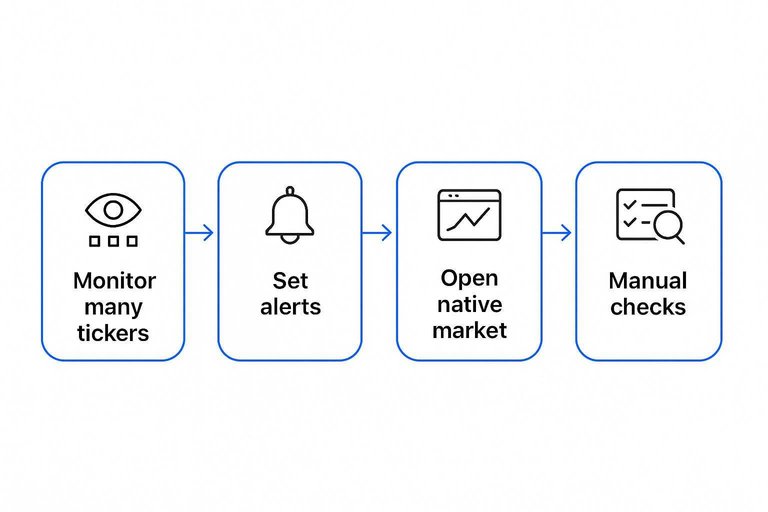
Use an aggregator to:
- Monitor many tickers at once
- Catch rapid reprices across categories
- Set alerts for threshold moves
Then open the native market only when something triggers. That’s how you stay fast without going blind.
Headline spikes
During breaking news, the risk shifts from speed to misread. Switch to manual when the market’s meaning can drift faster than the price.
- Breaking news changes assumptions mid-trade
- Ambiguous wording hides settlement traps
- Rule edge cases decide the payout
- Sudden volume anomalies suggest manipulation
In spikes, your best “latency” win is avoiding the wrong contract.
Low-liquidity plays
Thin books make aggregators look cleaner than reality. When spreads are wide, you need to see depth, recent fills, and who’s leaning.
Manual checks matter more because the displayed price can be untradeable size. One impatient market order can donate your edge to the spread.
Bigger position sizing
Size amplifies every mistake, including slippage. Scale up with a repeatable check that forces reality into view.
- Confirm order book depth at your intended prices.
- Stage entries in chunks instead of one sweep.
- Watch partial fills and re-price before continuing.
- Reassess after news, halts, or sudden spread widening.
If you can’t explain your exit at size, you’re not trading. You’re hoping.
Multivenue arbitrage
Arb only works if your comparisons are truly comparable. You’re not pricing markets, you’re pricing frictions.
- Synchronized timestamps across venues
- Fee and spread awareness
- Transfer and withdrawal constraints
- Settlement timing differences
- Execution speed you can trust
If any one of these is fuzzy, the “arb” is just a screenshot illusion.
Hybrid operating model
You need speed without trusting a single screen. Use aggregators to spot movement early, then switch to manual checks before you commit size.
The split is simple: machines detect, humans confirm. The edge comes from clean handoffs, not more tabs.
Trigger thresholds
Set hard triggers so you stop scanning and start verifying. You want rules that fire fast, even when you’re tired.
- Price jumps beyond your band
- Volume surges versus baseline
- Bid-ask spread widens sharply
- Market rules read ambiguous
If none of these trigger, you’re still in detection mode, not decision mode.
Two-tier watchlists
Keep two lists so your brain stops treating every market like a trade. One list is for pattern recognition, the other is for execution.
Imagine your aggregator flags ten markets per hour. Only the ones that pass your quick rule-read and liquidity check graduate to “trade.”
Your best filter is a smaller “trade” list, not a better memory.
Automation guardrails
Semi-automation helps, but only if it can’t outvote you. Build it to accelerate clicks, not bypass judgment.
- Alert on triggers with a direct market link.
- Open a prefilled ticket with size and limit defaults.
- Enforce a per-market max loss cap.
- Add a kill switch for runaway fills.
Automation should make the safe action the easiest action. For a regulatory framing of pre-trade controls and kill switches, see the CFTC’s risk controls & system safeguards.
Post-trade review
Fast trading needs feedback loops that don’t waste time. Log what you saw, what you missed, and why you acted.
Track two buckets: misses (you should have acted) and false positives (you reviewed, then passed). Then tune your filters and update your manual checklist with the specific failure mode.
If you don’t review, your triggers drift, and your “hybrid” becomes guesswork.
Final recommendation
For most fast traders, use a prediction market aggregator as your default screen. You’ll move faster, miss fewer obvious mispricings, and keep your attention on execution.
Do manual checks when the decision is big or the market is weird. If the aggregator feed is delayed, conflicting, or thin, open the source market and read the order book.
Power users should run both in parallel. Keep an aggregator tab for scanning, then use pinned direct links and a quick checklist for confirmation.
High-stakes traders should bias toward manual verification before size. Treat aggregators as radar, not instruments, and confirm price, liquidity, and settlement terms at the venue.
Fast-trading workflow you can run in minutes
When you compare prediction markets for a fast trade, the missing piece is usually not more analysis—it’s a repeatable sequence that forces you to (1) scan broadly, (2) verify only what matters, and (3) execute with pre-defined risk limits. The workflow below turns the aggregator-vs-manual decision into an executable routine you can repeat under time pressure.
Use the timing targets as guardrails, not rigid rules. If you can’t complete a step inside its time box, either defer the trade or downsize to match your confidence level.
Step-by-step workflow with timing targets
0) Pre-flight (once per session, 5–10 minutes)
- Choose your “trade universe” (events/types you’ll allow today).
- Set default max position size, max loss per trade, and a hard stop for “no new entries” near known event resolution windows.
- Open your reference tabs/tools: aggregator view, the underlying market(s), rules page(s), and a quick notes doc.
1) Aggregator scan (30–60 seconds per opportunity)
- Sort by the signal you care about (spread between venues, fast mover, or biggest recent change).
- Shortlist 1–3 candidates only.
- Record three numbers in your notes: current best price, second-best price, and where the aggregator claims the liquidity is.
2) Decide the path: aggregator-only vs manual-verify (15–30 seconds)
Use a simple gate before you spend time:
- Aggregator-only path if: the event is standard, the move is small, and you’re trading a small size.
- Manual-verify path if: the spread is unusually wide, the move looks news-driven, the market is near a key threshold, or you plan meaningful size.
3A) Aggregator-only execution (60–120 seconds total)
- Open the target venue directly from the aggregator.
- Confirm: price, available size, and that the contract matches the same outcome phrasing.
- Place a limit order at your pre-defined entry (don’t chase beyond your maximum slippage).
- Immediately set your exit logic (take-profit/stop or conditions for cancellation) in your notes.
3B) Manual verification (2–5 minutes total)
Time-box your manual checks—don’t “research until you feel good.”
- Market integrity check (30–60 seconds): confirm you’re looking at the correct contract/outcome; verify resolution criteria and any edge-case wording.
- Source check (60–120 seconds): identify what likely caused the move; validate with at least one primary source (official page/statement) or a clearly attributable report.
- Mechanics check (30–60 seconds): verify fees, settlement method, and whether trading is halted/limited.
- Liquidity check (30–60 seconds): look at the order book depth or recent fills; confirm you can enter/exit without obvious price impact.
Then execute with a limit order and record the reason you believe price is wrong (one sentence).
4) Post-entry monitoring (2–10 minutes, then periodic)
- Set a short monitoring window right after entry (this is where fast trades often fail if something was misread).
- If the thesis depends on a specific catalyst, set a reminder to re-check at a defined time.
- If price moves against you beyond your pre-set threshold, reduce or exit—don’t expand the manual check indefinitely to justify holding.
5) Post-trade review (60–120 seconds)
- Write: entry reason, whether aggregator signal was accurate, which manual check (if any) changed the decision, and what you’d do next time.
- Tag it: “aggregator-only worked,” “manual saved me,” or “workflow breakdown” for future tuning.
Fast-trader checklist (printable)
Before you click “Buy/Sell”
- [ ] Contract/outcome text matches exactly (no synonym traps).
- [ ] Resolution rules understood (who decides, what counts, edge cases).
- [ ] You know why price moved (or you’re intentionally trading without a catalyst, with smaller size).
- [ ] Liquidity is real at your intended size (not just a top-of-book mirage).
- [ ] Fees/settlement mechanics checked (anything that changes effective price).
- [ ] Limit order set; max slippage defined.
- [ ] Exit plan written (profit target and invalidation/stop).
- [ ] Position size matches confidence and time spent verifying.
After entry (immediately)
- [ ] Confirm fill price and size.
- [ ] Re-check you didn’t trade the wrong side/market.
- [ ] Set a monitoring reminder (time-based) or trigger condition (price/catalyst-based).
Operational rules that keep it fast (and safe)
- Time-box everything: if a manual check exceeds your budget, treat that as information—uncertainty is high.
- Scale time with size: larger positions require manual verification; small “probe” positions can be aggregator-led.
- One primary source rule: if the trade depends on a factual update, verify it from an official/primary channel when possible.
- Avoid “analysis creep”: you’re not trying to be perfectly informed; you’re trying to be consistently less wrong than the market.
- Default to limit orders: market orders turn speed into hidden slippage.
- Document the minimum: one sentence for thesis + one sentence for exit condition keeps review actionable without slowing you down.
Pick Your Default—and Define the Exceptions
If you trade fast, make an aggregator your default for scanning and alerting, then reserve manual checks for anything that changes sizing, venue choice, or thesis. Write down a few trigger thresholds (liquidity, spread, market ambiguity, headline intensity) that automatically force a manual confirmation step. The best fit is usually hybrid: let the aggregator find opportunities at speed, and let a time-boxed manual workflow prevent avoidable fills, misreads, and venue-specific surprises.
Frequently Asked Questions
- What should I look for when I compare prediction markets across platforms?
- Compare liquidity, bid–ask spread, market depth, fees, and resolution rules first, then check whether the venue supports the order types and speed you need for fast entries and exits.
- Are prediction market aggregator prices always accurate and up to date?
- Not always. Aggregators can lag during volatile news or miss venue-specific nuances like fees, market pauses, or thin order books, so verify the live order book on the execution venue before placing size.
- How do I compare prediction markets if two venues show different odds for the same event?
- Confirm the contract definitions and resolution criteria match, then compare executable prices after fees and slippage by checking the current best bid/ask and available depth on each venue.
- When I compare prediction markets, how can I tell if liquidity is real or just a misleading quote?
- Look beyond the top-of-book price and check order book depth, recent trade prints, and whether you can fill your intended size without moving the market substantially.
- Can I automate parts of how I compare prediction markets without taking on too much risk?
- Yes—automate data collection and alerting (odds changes, spread widening, volume spikes), but keep a pre-trade checklist for contract matching, fees, and live depth before execution.