
 Best Platforms
 Live Odds








MarketsPrediction vs IYKYK Markets: Which Is Better for Market Analytics?
Compare MarketsPrediction vs IYKYK Markets for prediction trades: cross-venue scanning vs Polymarket/Kalshi execution and wallet analytics, plus checks.
You’re trying to find a trade worth taking, fast, without getting fooled by noisy dashboards. When you’re comparing prices across venues or leaning on “smart money” and signal widgets, small misunderstandings—stale snapshots, mismatched resolution criteria, thin liquidity—turn into bad fills or the wrong side of a contract.
This comparison helps you pick the right home screen for your workflow: cross-venue scanning versus venue-deep execution and wallet analytics. You’ll get coverage and capability tables, a short “trust the numbers” checklist, the specific places IYKYK Markets is stronger, and decision rules for choosing one tool or using both in sequence.
Pick your workflow
In this matchup, “better” is a workflow fork: do you need a broad cross-venue discovery surface, or a Polymarket/Kalshi-focused view that goes deep on execution and participant context?
If your job is price shopping, you want a fast, cross-venue surface that makes it easy to spot where the action is and where the numbers differ. If your job is execution and participant analysis, you want fewer venues—but much more context about what’s happening inside them.
A practical default is a two-step workflow: shop broadly to find the market worth your attention, then switch to a venue-deep view to decide whether it’s actually worth trading.
Cross-venue shopping
This fits you if you:
- Start with “what’s active right now?” and need a ranked feed (e.g., Top Markets By Volume) with quick switches like per-venue “Top 30” views.
- Compare the same event across multiple brands at a glance; for example, a single “trending” card can show side-by-side platform percentages and a displayed volume like $27,757,819.
- Want filters that narrow quickly by platform and category, then click out to the venue when you’ve found the best price to investigate.
In practice, you stay on the ranked feed until you have a candidate—then click through to the underlying venue to confirm the live contract before you compare or trade.
Venue-deep analysis
This fits you if you:
- Mostly operate on Polymarket and Kalshi and want an analytics surface built around those two venues (free and usable without an account): IYKYK market detail view (rel=“nofollow”).
- Care about participant behavior—e.g., how specific trader addresses are positioned—more than cross-venue coverage.
- Treat “signals” as triage, not triggers; IYKYK explicitly positions signals as heuristic and says volume spikes still need independent verification.
The tradeoff is scope: it’s explicitly Polymarket+Kalshi, and its smart-money scoring is presented as Polymarket-scoped—not a cross-platform model.
Platform coverage
Coverage is the first eliminator. One product is built to aggregate across many brands (which can make early market scanning and price-checking faster); the other is built to go deeper on a narrow venue set.
| Dimension | MarketsPrediction (aggregator) | IYKYK Markets (venue-deep) |
|---|---|---|
| Venue scope | Multi-brand coverage | Polymarket + Kalshi only |
| Proof of breadth | Plus500, Polymarket, Kalshi, Foregate, Trendle listed; homepage metrics include $5.4B Weekly Notional Volume, 14.1M Active Markets, 117.0M Weekly Transactions, and $121.3B Open Interest (as of 2026-10-11) | Two-venue positioning |
| Navigation surfaces | “Top Markets By Volume”; per-venue “Top 30” buttons | Screener across the two venues |
| Data types in scope | Aggregates public odds, volume, liquidity, metadata | Analytics designed for Polymarket/Kalshi |
| “Smart money” scope | Not presented as a cross-venue model | Smart Money Tracker is Polymarket-scoped |
Two implications matter in practice:
- If you need coverage beyond Polymarket+Kalshi, the multi-platform surface is the only one in this pair that even tries to solve that problem—and it’s generally the more practical starting point when your goal is “where is this event most active / best priced right now?” across venues.
- If you need “smart money” analysis, read it as venue-specific: here that means a tool-defined score that’s explicitly scoped to Polymarket, not a symmetric cross-platform signal.
What you can do
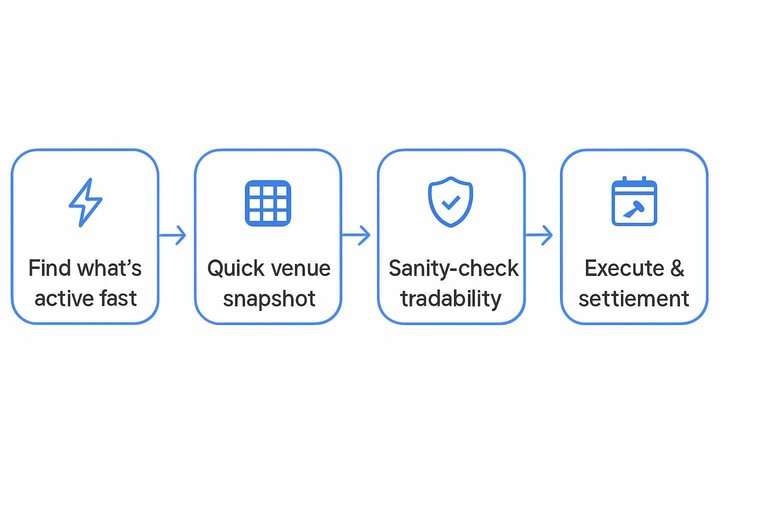
Five minutes before you place an order, the useful question isn’t “which site has more charts?” It’s “which surface changes my decision right now?”
| 5-minute decision step | Discovery/comparison surface (MarketsPrediction) | Venue-deep surface (IYKYK Markets) |
|---|---|---|
| Find what’s active fast | “Top Markets By Volume” as the primary feed | Screener (filtered list) across Polymarket + Kalshi |
| Narrow to a venue view | One-click “Top 30” switches (e.g., Plus500 / Kalshi / Polymarket / Foregate) | Filter by market-quality and context fields, then open the market detail |
| Get a quick venue snapshot | “Prediction Apps by Stats” brand table | Event clusters + heatmaps to browse movers by category/event |
| Sanity-check activity vs tradability | Brand stats include “Volume (24 h)” and “Total Liquidity” (e.g., Polymarket Volume (24 h) $57,036,190; Total Liquidity $314,324,893) | Liquidity/execution lens (depth/spread/slippage risk) to decide if size is actually tradeable |
| Triage “something weird is happening” | Cross-venue comparison can reveal pricing mismatches worth inspecting | Signals layer (toxic flow / whale patterns / volume spikes) to prioritize reviews |
| Decide if timing risk matters | Cross-venue surfaces get you to the contract quickly, but don’t manage settlement timing | Resolution calendar view to track expected settlement dates, delays, and disputes |
| Know what not to over-trust | Terms say market data is best-effort and may be delayed/cached/incomplete | Risk disclosure says signals/rankings are informational; data may be delayed/noisy: https://www.iykykmarkets.io/risk (rel=“nofollow”) |
One practical way to use this distinction: use the discovery surface to pick which market deserves your attention, then use the venue-deep surface to decide whether you can actually execute and hold it through settlement without surprises.
Trust the numbers
Use disclosures like a pre-trade checklist. You’re not asking “is this chart accurate?”—you’re asking “what’s the easiest expensive way to misread it, and how do I prevent that?”
-
Start with “where did this number come from?”
MarketsPrediction describes itself as an independent information/comparison/analytics site that aggregates publicly available third-party venue data (odds, prices, volumes, liquidity, and market metadata) rather than executing trades. Its Terms also say it is not an exchange/broker/dealer/sportsbook and does not accept or transmit customer funds or execute/rout/place trades; treat every cross-venue figure as a copy until you’ve opened the underlying venue page you’d actually trade on. It also discloses it may receive compensation when users click links, use promo codes, sign up, or deposit—and that this compensation may influence which platforms/offers appear and how they’re displayed. None of that makes the data unusable; it just tells you how to use it: as a comparison layer, not as the final execution source of truth. -
Kill stale data before you compare anything.
If the page tells you data is “best-effort” and may be delayed, cached, incomplete, or temporarily unavailable, act like it is. Refresh, then click through to the venue and confirm the current price and the market state at the moment you’re about to place the order. -
Validate cross-platform matches by reading the contract rules, not the title.
Cross-platform matching—the act of deciding two markets on different venues represent the same underlying event—can fail. Even when the event name looks identical, check the resolution criteria (the written YES/NO settlement rules, resolution source, and edge-case handling) on both venues before you treat a “price gap” as real; automated comparisons can be wrong due to matching errors, stale inputs, or materially different resolution criteria. -
Separate “activity” from “tradability” using execution metrics.
A cross-venue view is most helpful when it pushes you beyond “what’s trending” into “what can I actually trade efficiently.” Volume is mainly turnover (and can reflect hedging/arbitrage/speculation), while liquidity is the more direct tradability comparator. Before sizing up, check liquidity (how costly it is to trade without moving price): spread (bid/ask gap), depth (size available near price), and slippage/price impact (how much worse your average fill gets as you consume depth). A more defensible cross-venue check is the fee-adjusted executable price for a standardized size—not raw volume. -
Treat IYKYK’s “signals” as triage, and verify with first-principles data.
IYKYK is explicit that signals and rankings are informational and its data can be delayed/noisy (see IYKYK’s risk disclosure (rel=“nofollow”)). If you’re using wallet analytics (inferences from public on-chain addresses that don’t map cleanly to real identities) or a smart money score (a platform-defined weighting of historically successful participants), use it to prioritize what to review—then confirm the thesis on the actual market and contract.
If you do only one thing: never act on a cross-venue comparison or a signal until you’ve read the contract’s settlement rules on the venue you’ll trade.
Where IYKYK wins
If your last-mile decision is “can I actually get filled at my size, and who’s leaning on this market?”, IYKYK is built for that. It stays focused on Polymarket/Kalshi and trades broad coverage for execution- and participant-level context.
- No-login, $0/mo analytics that gets you to a tradeable short list fast. The screener is the home base: you filter markets by liquidity/spread/volatility and then drill straight into the market detail.
- Liquidity and execution lens, not just activity. You’re looking at depth, spread, and slippage risk (how much worse your average fill gets as your order consumes the book), which is the difference between “busy” and “tradable.”
- Wallet/trader views that change your conviction. Leaderboards and wallet pages let you see where specific addresses are positioned and how concentrated a market is—useful when you suspect a few accounts are moving price.
- Signals as triage. “Toxic flow” (one-sided aggressive trading), whale patterns, and volume spikes help you pick what to inspect first—without pretending to be an autopilot.
- Resolution calendar for timing risk. If settlement timing, disputes, or delays would change whether you hold the position, the calendar view keeps that front-and-center.
Real limits: it’s explicitly Polymarket + Kalshi only, smart-money scoring is presented as Polymarket-scoped, and the platform is upfront that signals are heuristic and data can be delayed/noisy. See, for example, its research work on Polymarket wallet behavior across 7,655 wallets: Blind Detection of Insider-Like Trading (rel=“nofollow”).
Decision rules
- Pick your home screen by what you’re eliminating first.
- If you start by eliminating venues (where is this priced / where is it active?), make MarketsPrediction your default.
- If you start by eliminating trades (can I get filled cleanly / who’s leaning on it / what’s the settlement risk?), make IYKYK Markets your default.
- Use this persona default.
- Arbitrage / line shoppers: aggregator first, always.
- Political forecasters: aggregator for breadth, then venue-deep only on the short list.
- On-chain wallet trackers: IYKYK first (wallet pages + trader views), then click through to the actual venue.
- Execution-quality hawks: IYKYK first for depth/spread/slippage risk, even if you discovered the contract elsewhere.
- Run a two-tool flow when the “same event” might not be the same contract.
- Start on the aggregator to spot cross-venue price gaps.
- Before you believe the gap, open the venue and read the resolution criteria.
- Then switch to IYKYK to judge whether you can actually execute at size without ugly fills.
- Use hard constraints as tie-breakers.
- IYKYK is explicitly Polymarket + Kalshi only, and its smart-money scoring is Polymarket-scoped.
- The aggregator’s own terms say it can be compensated for clicks/sign-ups/deposits, which can influence which offers appear.
- Next action: set your home screen, then save the other tool as your “confirm before trade” tab (https://www.iykykmarkets.io/ rel=“nofollow”).
Set your home screen now
If you’re trying to find a trade worth taking fast across venues, make MarketsPrediction your default screen: it’s the quickest way to spot where an event is active and how pricing differs before you commit attention. When the decision hinges on whether you can actually get filled cleanly (depth/spread/slippage), who’s leaning on the market, or whether settlement timing changes the risk, switch to IYKYK Markets—just remember it’s Polymarket+Kalshi only and its smart-money scoring is Polymarket-scoped (https://www.iykykmarkets.io/ rel=“nofollow”). Whichever surface you start on, don’t let a dashboard pick the trade for you: refresh, click through to the venue you’ll trade on, and read the contract’s resolution criteria before you trust any “gap” or signal. First move: set MarketsPrediction as your scanner, then keep the other tool as a “confirm before trade” tab for the short list you’re actually considering.
Frequently Asked Questions
- Can I place trades directly from MarketsPrediction, or is it only analytics?
- MarketsPrediction is an information and comparison site, not a venue for execution. Its Terms of Use say it does not accept or transmit customer funds and does not execute, route, or place trades.
- If MarketsPrediction and IYKYK Markets show different odds for the “same” event, how do I verify which one is right?
- Open the market on the venue you would actually trade on and compare the written resolution/settlement rules—not just the market title. If the rules don’t match, treat it as two different contracts and ignore the apparent price gap.
- Do I need IYKYK Markets if I’m mostly doing cross-platform line shopping?
- No—start with a cross-venue discovery surface that lets you scan multiple platforms quickly, then switch to a venue-deep view only for the short list you’re considering trading. This keeps your time spent on wallet/execution detail focused on markets you actually might trade.
- What’s the difference between “volume” and “liquidity” in prediction market analytics, and which should I use to size a trade?
- Use liquidity to judge tradability at size, because it reflects how much you can trade near the current price without moving it too far. Use volume as an activity signal, then confirm tradability by checking spread, depth, and expected slippage on the venue.
- Can I pull Polymarket market data via an API instead of using MarketsPrediction or IYKYK Markets?
- Yes—Polymarket data can be accessed through the Polymarket Gamma API if you’re building your own pipeline. You’ll still need to map markets correctly and validate each contract’s resolution rules before acting on any comparison.