
 Best Platforms
 Live Odds








Oddpool Pricing Plans: Free vs Pro/Premium (Closed) vs Enterprise
Oddpool plan breakdown: signup status, Free Search/Historical, Pro Whale, Premium Arbitrage/Spreads, API/WebSocket limits, and resale/automation Terms.
You’re trying to pick a data plan that won’t fall apart once you start tracking more than a couple of markets, building alerts, or wiring data into a model. Get it wrong and you either overpay for features you can’t use, or you hit throttles and hard caps right when speed matters.
This comparison breaks Oddpool’s Free, Pro, Premium, and Enterprise tiers into the things that actually decide the purchase: what you can access at each tier, the API/WebSocket quotas and streaming constraints, and the Terms that can block resale or “automation.” It also flags when a discovery tool like MarketsPrediction may be the better fit than a data subscription.
Availability first
Subscription status
If you’re trying to decide between Free vs Pro vs Premium, start with the blocker: Oddpool says it’s no longer accepting new subscriptions. Existing subscriptions and free accounts continue as normal, but the Pro and Premium signup buttons show “Not available.” You can confirm the current state on Oddpool’s pricing page (rel=“nofollow”).
That means your real decision today is usually Free vs an Enterprise conversation, not “which paid tier should I pick.”
What Free includes (and where it hits hard limits)
Free is still a usable account—just one with tight throughput and real-time constraints:
- Price: $0 forever.
- Dashboards: access to 750+ event dashboards.
- Search + history: the API access table lists Search and Historical data as available on Free.
- REST API limits: 1 request/second, 1,000 requests/month, and 1 API key.
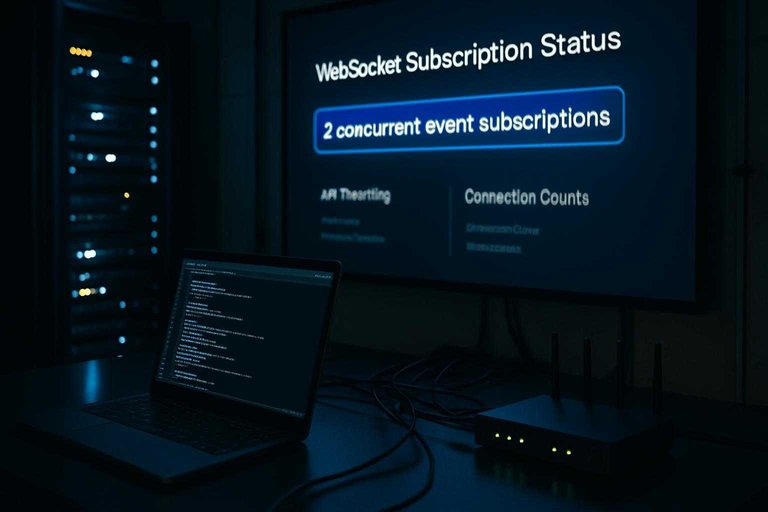
- WebSocket limits: WebSocket (a persistent streaming connection) is dist-only on Free, with 1 connection, 2 concurrent event subscriptions, and no snapshots.
If your workflow needs heavier API usage or full real-time channels (order books/trades/snapshots), you’ll be forced into “wait for paid plans to reopen” or “talk to Oddpool about Enterprise.”
What each tier unlocks
Oddpool’s plan labels map cleanly to endpoint groups—Oddpool’s name for a cluster of related API features (like Search, Historical data, Whale tracking, and Arbitrage) that unlock together at specific tiers.
The UI side is simpler: the core event dashboards are part of the product experience across tiers, while the tier decision mostly comes down to whether you’re only finding markets and pulling history (Free), you also need whale-trade signals (Pro), or you’re trying to systematically detect cross-venue disagreement (Premium).
Tier access table
| Feature / endpoint group | Free | Pro | Premium | Enterprise | Signup note |
|---|---|---|---|---|---|
| Search | Included | Included | Included | Included | Free: available |
| Historical data | Included | Included | Included | Included | Pro: not available |
| WebSocket channels | dist only | book/trade/snapshot | book/trade/snapshot | book/trade/snapshot | Premium: not available |
| Whale tracking | Not included | Included (30/mo) | Included | Included | Enterprise: talk to Oddpool |
| Arbitrage | Not included | Not included | Included (100/mo) | Included | See pricing page status |
| Price spreads | Not included | Not included | Included (100/mo) | Included | See pricing page status |
Pro is the “alerts and monitoring” tier. Oddpool defines whale trades as individual trades that cost $1,000 or more, and its Whale Tracking page draws an operational line between tiers: Pro subscribers can track 10 events, while free users can track one. If your workflow is “watch a small set of events and react when unusually large trades hit,” this is the first tier that supports it directly.
Premium is the “disagreement and execution research” tier. It’s where Oddpool unlocks the Arbitrage and Price spreads endpoint groups, which are the two pieces you need if you want a programmatic feed of “where the platforms disagree” instead of manually checking dashboards.
This is also where a cross-venue trader has to care about whether markets are settlement-fungible—whether two same-looking markets across venues actually settle under identical rules—because a spread you can see isn’t the same thing as an arbitrage you can safely settle.
Tier access table
| Feature / endpoint group | Free | Pro | Premium | Enterprise | Signup note |
|---|---|---|---|---|---|
| Search | Included | Included | Included | Included | Free: available |
| Historical data | Included | Included | Included | Included | Pro: not available |
| WebSocket channels | dist only | book/trade/snapshot | book/trade/snapshot | book/trade/snapshot | Premium: not available |
| Whale tracking | Not included | Included (30/mo) | Included | Included | Enterprise: talk to Oddpool |
| Arbitrage | Not included | Not included | Included (100/mo) | Included | See pricing page status |
| Price spreads | Not included | Not included | Included (100/mo) | Included | See pricing page status |
API and WebSocket limits
Oddpool enforces both a REST rate limit (how many requests per second you can make before throttling) and a monthly quota (how many requests you can make in a month before requests are blocked). On Free, the ceiling is concrete: 1 request/second on REST and 1 API key—so a single script that polls aggressively can saturate the tier fast. If what you actually need is quick cross-platform price discovery (rather than powering your own low-latency execution), it can be simpler to do the initial scanning in an aggregator like MarketsPrediction and reserve Oddpool API usage for the narrower set of markets you truly need to monitor programmatically. For streaming, the constraints move to WebSocket channel types (Oddpool’s real-time feed categories: dist/book/trade/snapshot), plus how many connections you can open and how many events you can stream at once; on Free, Oddpool allows 1 WebSocket connection and 2 concurrent event subscriptions.
| Plan | REST rate limit | Monthly quota | API keys | WebSocket connections | Concurrent event subscriptions | WebSocket channel types | Snapshots |
|---|---|---|---|---|---|---|---|
| Pro | 10 req/sec | 1M requests/mo | Unlimited | 3 | 10 | All | Included |
| Premium | 25 req/sec | 5M requests/mo | Unlimited | 10 | Unlimited | All | Included |
| Enterprise | 500 req/sec | Unlimited | Unlimited | Unlimited | Unlimited | All | Included |
Polling breaks first on the per-second throttle. If your workflow is “hit REST every second for fresh prices,” you’ll feel the rate limit before you feel the monthly quota. One wrinkle: Oddpool’s Premium launch changelog also calls out a “1,000 req/min rate limit for real-time polling,” which doesn’t cleanly match the Premium docs number, so a polling-heavy design should verify which throttle actually applies before you build around the higher headline.
Streaming breaks first on what you’re allowed to subscribe to, then on subscription counts. The moment you need book/trade updates or periodic snapshot messages, you’re out of Free-style constraints; even before you hit higher-tier throughput, Free’s 2 concurrent event subscriptions is a hard cap, and Pro’s 10 concurrent event subscriptions is the first higher ceiling you’ll run into.
Multi-market monitors break on fan-out. Watching many events simultaneously pushes you into splitting coverage across multiple WebSocket connections (and quickly beyond Pro’s 3 connections), or moving up to Premium/Enterprise where the event-subscription ceiling is removed. Practically, many teams reduce fan-out by using a discovery layer (e.g., a trending/volume feed across venues) to decide what’s worth streaming in the first place, then allocating their limited subscriptions to only those highest-priority markets.
Terms that change decisions
Resale restrictions
Oddpool’s Terms of Service (last updated March 11, 2026) draw a clean line that can rule out Pro/Premium for commercial products: the Service/API data is licensed for “personal, internal use.” In plain terms, that means you can use it inside your own workflow, but you’re not buying redistribution rights.
The same Terms explicitly prohibit reselling or redistributing Oddpool data, and they also prohibit incorporating Oddpool data into “a competing product, data feed, or commercial API.” That matters if you’re building anything that looks like “Oddpool, but embedded” — for example:
- a paid dashboard that republishes Oddpool-derived prices or signals to customers
- a syndication feed you sell to other teams
- a cross-venue data API where Oddpool is one of the inputs
Even if your product focuses only on Kalshi and Polymarket, those prohibitions are about downstream use, not which venues you cover. If your plan is to ship data to end users (or other systems you don’t fully control), treat this as an Enterprise licensing conversation, not a feature-tier choice.
Automation ambiguity
Oddpool’s positioning creates a second decision-changing edge case: it markets Premium as “Built for automated strategies,” but the Terms forbid using the Service “for gambling, trading automation, or investment advice delivery.” That doesn’t tell you what kind of automation is acceptable.
Questions worth asking Oddpool (in writing) before you build:
- Alerting vs execution: Is an automated alert bot allowed if it never places orders? What about a bot that triggers trades elsewhere?
- “Trading automation” scope: Does it mean automated execution only, or any systematic, always-on strategy logic?
- Advice delivery: If your app pushes “buy/sell” style recommendations to users, does that count as “investment advice delivery” even if you include disclaimers?
- Research tooling: Is unattended data collection for backtests permitted if results never leave your org?
If they can’t clearly define what they consider “trading automation,” you don’t have a stable compliance surface to build on.
Where MarketsPrediction fits
If your primary need is cross-platform discovery — scanning odds/volume/liquidity across venues and seeing what’s trending — MarketsPrediction is the more natural fit because it’s designed as an aggregator UI, not as a licensable data feed for redistribution.
Its practical limits are also visible in the product experience: some platform browsing is constrained to Top 30 lists, and promo offers come with eligibility restrictions (including age and U.S. residency requirements). If you need a normalized, programmatic dataset you can operationalize internally, Oddpool is built for that — but these Terms clauses decide whether you’re allowed to turn that internal edge into a product.
Enterprise and institutional
Enterprise (and Oddpool’s “institutional” offering) is less about “more API” and more about getting a research-grade dataset and delivery contract that you can build infrastructure around.
On the dataset side, Oddpool’s institutional page describes coverage as every orderbook delta and trade on Kalshi and Polymarket, millisecond-stamped, and it makes the key implication explicit: neither exchange offers historical backfill, so a third-party archive is the product. It also publishes a concrete example of “symbology meets reality”: in a sample of 250 matched events, only 34% are labeled Identical, with the remaining 33% split across Settlement window and 33% across Settlement universe—exactly the kind of edge case an institutional dataset has to encode, not hand-wave.
On delivery, this is where “custom” gets real. Oddpool calls out Hive-partitioned Parquet—a columnar file format stored in a partitioned directory layout that tools like DuckDB/Spark can query directly without a proprietary client—plus options like S3 data dumps and custom feeds (including FIX, a common trading-industry protocol mentioned as a potential enterprise delivery format; usually relevant only for institutional integration).
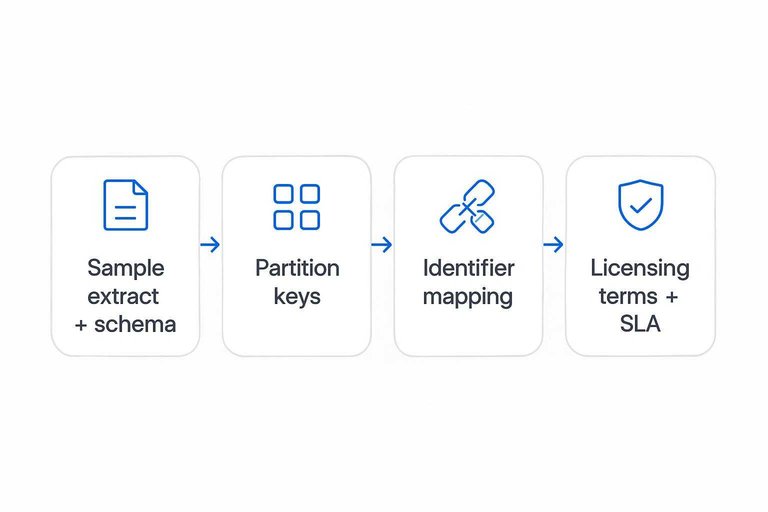
What’s still a call item: ask for a small sample extract + schema, the partition keys (how the Parquet is laid out), the identifier mapping you’ll use in your systems, the licensing terms for your downstream use, and the exact SLA/support commitments in writing.
Plan selection checklist
Follow this flow to land on Free vs can’t subscribe vs an Enterprise call.
- If you only need Search + Historical for research (Oddpool claims 700K+ markets searchable), pick Free.
- If you need the Whale endpoint group, that’s Pro → if you can’t start Pro today, you can’t subscribe.
- If you need Arbitrage or Price Spreads, that’s Premium → if Premium signup is closed, you can’t subscribe.
- If your build requires full WebSocket channels beyond dist-only (book/trade/snapshot), treat it as can’t subscribe unless you can go Enterprise.
- If you’ll redistribute Oddpool-derived data or embed it in a competing feed/API, skip tiers and book an Enterprise licensing call.
Decide based on what breaks
Oddpool’s plan choice is mostly decided before you compare features: Pro and Premium aren’t currently open to new signups, so you’re effectively choosing between staying on Free (Search + Historical, with tight REST/WebSocket caps) or having an Enterprise conversation for full streaming, higher fan-out, and licensing you can actually build on (https://www.oddpool.com/pricing (rel=“nofollow”)). If you’re primarily scanning across venues to find what’s worth watching, do that discovery in MarketsPrediction first, then spend your limited Oddpool usage only on the specific markets you need to monitor or pull history for. If your workflow involves redistribution, embedding Oddpool-derived data in a commercial feed/API, or anything that could be read as “automation,” treat it as an Enterprise/legal question up front—because those Terms constraints can make the paid tiers the wrong product even when the endpoints look perfect.
Frequently Asked Questions
- What were Oddpool Pro and Premium prices before signups closed, and why do third-party pricing pages disagree?
- Oddpool’s own pricing page lists Pro at $30/month and Premium at $100/month, but third-party directories can be wrong (for example, SaaSHub shows $20/month). Treat off-site pricing as untrusted and verify on Oddpool’s pricing page before budgeting.
- Is an Oddpool “whale trade” $500+ or $1,000+, and which threshold should I build around?
- Oddpool’s product pages are inconsistent: the pricing page label says “Whale trade tracking ($500+)” while the Whale Tracking explainer defines whales as trades costing $1,000 or more. If you’re automating alerts, use Oddpool’s Whale Tracking definition as the operational rule and document the discrepancy in your spec.
- If Oddpool Pro/Premium are “Not available,” can I still pay for Oddpool through Stripe or another checkout link?
- No—if Oddpool shows Pro/Premium signup as “Not available,” there isn’t a supported self-serve path to start a new paid subscription. The only viable upgrade route is an Enterprise conversation (or waiting for self-serve tiers to reopen).
- Can I use Oddpool Free for real-time trading signals, or is it only good for research?
- Oddpool Free supports Search and Historical data plus a limited WebSocket feed, but its hard caps (dist-only streaming, no snapshots, and low REST throughput) block most stateful real-time strategies. Use Free for discovery and backtesting inputs, and only design real-time systems around Oddpool if you can access paid WebSocket channels or Enterprise delivery.
- What should I use for cross-platform market discovery if Oddpool’s paid plans are closed?
- Use a discovery-first aggregator like MarketsPrediction to scan live odds, volume, and liquidity across platforms, then narrow to a short list of markets you actually need to monitor. This reduces how much you rely on Oddpool’s API/WebSockets while paid tiers are unavailable.