
 Best Platforms
 Live Odds








Oddpool Review: Features, Limits, and API Access
A comparison that settles whether Oddpool is a viable data layer for cross-venue monitoring and automation — what Oddpool actually is and the current availability constraint, API access by plan, WebSocket event_key subscriptions with dist/book/trade/snapshot channels and operational gotchas, historical data breakdowns, and Terms that block certain uses so you can decide between Oddpool, MarketsPrediction, or building your own feed.
You’re trying to monitor fast-moving yes/no markets across more than one venue and act when prices diverge. If your data feed is missing books, goes quiet without warning, or can’t be legally reused, you’ll ship alerts you can’t trust—or a bot you can’t run.
This review breaks down Oddpool as it works today: which API endpoints you get on each plan, how its live stream is subscribed by event_key and split into dist/book/trade/snapshot channels, what the historical endpoints omit, and which Terms can block automation or redistribution. You’ll leave with a checklist to decide if it fits your workflow.
Oddpool, in reality
What it actually is
Oddpool is best understood as a normalized data layer for prediction markets: instead of you wiring up Kalshi and Polymarket separately, it gives you one interface for search, history, and live feeds across venues.
On the product side, that shows up as a heavy “dashboard-first” experience (Oddpool markets 750+ event dashboards) plus tooling like charts, paper trading, and an in-app analyst bot (“Oddbot”). On the developer side, it’s two APIs: a REST API (HTTP endpoints you poll for search and historical pulls) and a WebSocket feed (a single streaming connection for live market updates). Oddpool’s own positioning is explicit about the mix: “Search across 700K+ markets, pull historical orderbooks, stream live probabilities.”
If your main pain is Kalshi/Polymarket plumbing—two schemas, two IDs, two sets of edge cases—Oddpool’s “one data model” approach is the core value.
Availability constraint
Here’s the catch that changes the entire evaluation: Oddpool’s pricing page says it is “no longer accepting new subscriptions,” while “existing subscriptions and free accounts continue as normal” (https://www.oddpool.com/pricing).
In practice, that means the public price points—Pro at $30/month and Premium at $100/month—can be irrelevant if you’re not already subscribed. If you’re evaluating Oddpool specifically for paid-tier capabilities (especially the parts of the API that are plan-gated), this freeze can block you before you even get to feature fit.
If you need cross-platform discovery right now and don’t want your workflow to hinge on a subscription queue, MarketsPrediction is built for scanning and comparing live odds and activity across multiple platforms in one place.
API access by plan
Oddpool’s Search endpoints are where you’ll first run into series_id—an identifier for a recurring/related group of events that you can use as an organizing and filtering unit when you query markets.
When you’re planning automation, separate rate limit (how fast you can call the REST API, in requests/second) from monthly quota (how many total REST requests you’re allowed per month before you’re capped). Both can block you, but they fail differently: rate limit stops bursts; quota stops always-on polling.
| Plan | Price (USD/mo) | REST hard limits | WebSocket hard limits | Endpoint groups you can call |
|---|---|---|---|---|
| Free | $0 | 1 req/sec; 1,000/month | 1 connection; 2 events; dist-only; no snapshots | Search; Historical; WebSocket (dist only) |
| Pro | $30 | 10 req/sec; 1M/month | 3 connections; 10 events; all channels; snapshots | Search; Historical; WebSocket (all); Whale |
| Premium | $100 | 25 req/sec; 5M/month | 10 connections; unlimited events; all channels; snapshots | Search; Historical; WebSocket (all); Whale; Arbitrage; Price spreads |
| Enterprise | Not published | 500 req/sec; Unlimited/month | Unlimited connections; unlimited events; all channels; snapshots | Search; Historical; WebSocket (all); Whale |
The practical gating is simple: if your workflow needs orderbook/trade streaming (not just the cross-venue probability distribution), you’re in Pro+. If it needs arbitrage/spread endpoints, you’re in Premium—or you’re not doing that part inside Oddpool’s API at all.
WebSocket: fit for bots?
Oddpool’s WebSocket is designed around a single live connection (wss://feeds.oddpool.com/ws) that you “attach” to specific events and channel types, rather than a firehose where something is always happening. That design is workable for bots, but only if your infrastructure treats “silence” as a normal state and you have a plan for periodic full-state reconciliation.
event_key addressing
Subscriptions are keyed by event_key—Oddpool’s venue-agnostic identifier for an event—so you subscribe to something like dist:fomc-2026-04-29 instead of wiring Kalshi tickers and Polymarket condition IDs separately.
The practical win is plumbing: one identifier routes you to cross-venue data for the “same” event, which keeps your storage schema, routing keys, and bot configs stable even when the underlying venues use different IDs. If you’re running multi-venue monitoring, event_key is the join key you build around, not an afterthought.
Channels and snapshots
Oddpool splits the stream into channel types. dist is the cross-venue, liquidity-weighted probability distribution (a single combined probability curve where each venue’s implied probability is weighted by available liquidity). book and trade are the venue/outcome-level feeds: order book updates and executions.
The operational reality is that dist, book, and trade are explicitly change-driven. If nothing changes, nothing is sent—an idle socket can be “healthy” by design. Oddpool’s docs call this out and recommend pairing change-driven channels with snapshot:{event_key}, which delivers a full state message every 60 seconds. That turns the system into “deltas + periodic resets,” which is a much easier contract for bots that need staleness detection and recovery after reconnects.
Plan gating matters here: Free can subscribe to dist only and does not include snapshots, so you don’t get that scheduled 60-second full-state safety net. If your bot requires deterministic state reconstruction (especially for order books), snapshots are the feature that makes the feed feel reliable rather than “best effort.”
Operational gotchas
A few details in the wire format and catalog can bite you if you assume a typical market-data stream:
- No message
typefield. The wire wrapper has exactly two top-level fields—channelanddata—so your dispatcher should route on the subscribed channel string, not a per-message type tag. - A venue can be listed but not quoting. The feed catalog’s
venueslist means “configured,” not “currently quoting,” so an event can show multiple venues while one has no live book. - Crypto payloads carry extra reference data. On crypto events, every
dist/book/trademessage includes areferencefield populated with real-time Binance spot and futures fields (includingfunding_rateandvolume_24h), and that field is only present on crypto events.
If you treat the feed as “event-driven deltas plus periodic snapshots,” these quirks become straightforward engineering constraints instead of mysterious data gaps.
Historical data breakdowns
Backtests fail less from “bad code” and more from quiet data constraints. With Oddpool, the big ones are start dates, cadence floors, per-call windows, and responses that omit markets without warning.
-
Start date hard stop (OHLCV): 2026-03-21. Oddpool’s OHLCV bars only go back to 2026-03-21. If your strategy needs earlier cycles, you don’t have a longer lookback to buy—you need a different data source for that period.
-
Event history disappears if the market resolved before that date. Event OHLCV works on Kalshi and Polymarket events, but if the event’s markets resolved before 2026-03-21, there won’t be OHLCV history for them. Before you trust a backtest, sample a few “old resolved” events and confirm you get non-empty bars.
-
Cadence floor: no sub-6h OHLCV bars. The Market OHLCV endpoint is built on a 6-hour snapshot cadence, so 1h/5m-style OHLCV is simply not available there. If your model needs intraday bars, you’ll have to use a different historical surface (or ingest venue-native data).
-
Per-call limits: 1–50 markets and a 365-day window. Market OHLCV takes 1–50
market_ids per request (amarket_idis the venue-specific market identifier you pass to historical endpoints—Kalshi market tickers or Polymarket condition IDs, depending on the endpoint), and each request tops out at a 365-day window. For multi-year pulls, chunk time ranges and stitch them, then assert continuity. -
Silent omissions: “not in snapshot pipeline” returns nothing (quietly). Oddpool’s OHLCV docs warn that markets not in their snapshot pipeline are silently omitted from responses. Treat “missing rows” as a first-class error: diff the IDs you requested against the IDs you got back and log the misses.
-
Orderbook backfills are paginated and discretized. Kalshi’s historical orderbook endpoint uses
granularity(default1m) with a documented snapshot interval of1mor5m, and pagination defaults to 100 rows with a 200 max per page. If you’re reconstructing microstructure, build a paginator first—then verify you’re not accidentally truncating history.
Terms that block you
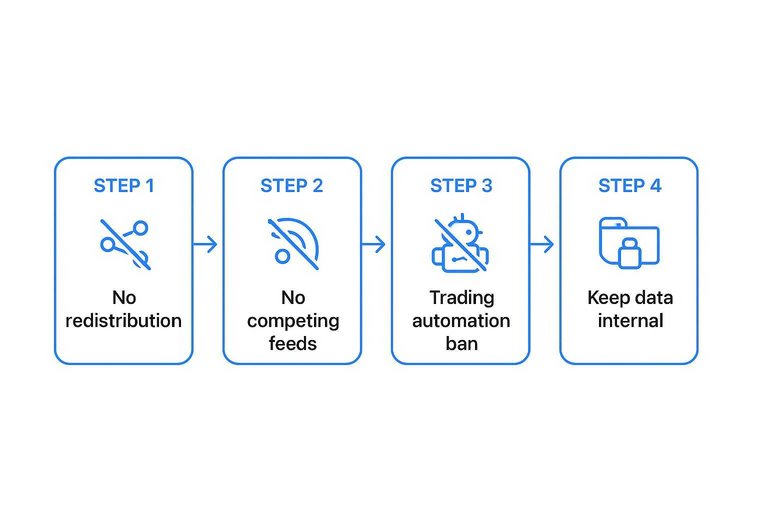
Oddpool’s Terms of Service (Last Updated: March 11, 2026) draw three hard lines that matter more than any endpoint list: no redistribution, no competing feeds, and a surprising “trading automation” ban (https://www.oddpool.com/terms). Those aren’t “lawyerly edge cases.” They change what you’re allowed to build.
First: the Terms prohibit reselling, sublicensing, or redistributing Oddpool data. If your product’s value is “Oddpool data, but packaged nicely”—a paid dataset, an email alert service, a Slack/Discord feed, or a customer-facing analytics panel—that’s the line you cross.
Second: the Terms also prohibit incorporating Oddpool data into “a competing product, data feed, or commercial API.” That blocks the most common “developer” monetization path: using Oddpool as an upstream provider and exposing it downstream. Public dashboards fall into the same risk bucket if they function as a live odds feed or market-data surface you’re publishing under your own brand.
Third (and most operationally awkward): the prohibited-conduct list includes using the service for “gambling, trading automation, or investment advice delivery.” That’s in direct tension with the way people talk about Oddpool’s automation use cases, and it creates a compliance problem for bots: even if you’re only automating your own trading, you’re building on top of something the Terms say you “may not” do.
Project-level fallout is predictable: keep Oddpool data internal, treat it as a non-redistributable input to your own analysis, and assume anything that looks like a public feed, a signal-selling business, or a bot-first product needs a different data source (or a written exception). If what you want to publish is “live cross-venue odds,” that’s the use case a site like MarketsPrediction is built around—but Oddpool’s Terms make it a poor upstream for that distribution model.
Where others win
Oddpool is strongest as an internal normalization layer. The moment your plan involves publishing or packaging what you ingest, its Terms become the deciding factor: no redistribution/resale, no “competing” feed, and a prohibition that explicitly names “trading automation.”
That combination isn’t abstract. It rules out entire business models (public dashboards, paid datasets, signal subscriptions) before you write a line of code.
MarketsPrediction fit
If your primary job is cross-platform discovery—finding what’s active right now and comparing venues—Oddpool’s API constraints are the wrong bottleneck to accept. This is the use case where a dedicated aggregation UI like MarketsPrediction wins: cross-platform live odds in one place, trending markets, category/platform filters, top-by-volume lists, and platform comparison tables that make it obvious where liquidity and activity actually are.
It also avoids a quiet source of confusion about what “cross-venue” means today. Oddpool’s marketing and docs commonly center Kalshi + Polymarket, but its changelog notes that on Feb 16, 2026 it “added Opinion as a third venue to the Arbitrage Scanner.” If you need broad venue coverage and clarity about where it shows up (UI vs API vs which endpoints), pick the layer whose product surface makes that explicit.
Known trade-offs still matter: promo offers can carry eligibility constraints, and some browsing can be capped to “Top 30” lists—fine for scanning, not for exhaustive catalog work.
Build vs buy
If you need redistribution, a public dashboard, or a commercial data feed, Oddpool’s “no resale/redistribution” and “no competing product/feed/API” clauses block the cleanest implementation: using Oddpool as your upstream and passing data downstream.
At that point, the compliant path is usually boring: integrate venues directly (Kalshi/Polymarket, and any others you support), normalize the schemas yourself, and publish only what those venue terms allow you to publish.
The same logic applies to bots. When the Terms call out “trading automation,” running automation on venue-native data (under venue-native terms) is a cleaner compliance story than building on top of a layer that forbids the behavior you’re implementing.
Viability checklist
Run this before you commit your architecture. It turns Oddpool’s real constraints—tier access and Terms-of-Service prohibitions—into a yes/no on plan fit and policy risk.
-
Gate on access, not features. If you can’t actually obtain the tier you’d need (given Oddpool’s subscription freeze), redesign now—don’t build a Premium-shaped system on a Free-shaped account.
-
Write down your “automation” reality. If your workflow is a trading bot, a signal service, or anything that republishes live odds/data, treat it as a Terms-of-Service decision before it’s a technical decision.
-
Map your workflow to endpoint groups (then the tier).
- Search/Historical-only ingestion → Free-compatible.
- Live book/trade + snapshots and Whale flows (for example,
/whales/user/feed) → Pro+. - Arbitrage/Spreads (for example,
/arbitrage/currentand/arbitrage/current/difference) → Premium.
-
Design for limit enforcement. Oddpool’s REST limits show up two ways—requests/second and monthly quota—so handle both: when you hit HTTP 429s, obey
Retry-Afterinstead of retrying blindly. -
Prove auth + key handling. Your REST calls use an
X-API-Key; decide storage/rotation before you automate. -
Verify against current docs, not old blog posts. Oddpool’s changelog (https://www.oddpool.com/changelog) is a useful sanity check: third-party summaries still describe the API as “Whale Tracking only” and “Pro subscription required,” even though current docs expose Search + Historical on Free and reserve Arbitrage + Price Spreads for Premium.
If your end product is public cross-platform scanning, MarketsPrediction is the cleaner fit than fighting redistribution risk.
Decide on policy before plumbing
Oddpool earns its keep when you need a single, normalized Kalshi + Polymarket data layer and you’re keeping the output internal—especially if you can actually get the tier that unlocks the channels and endpoints your system needs. But for anything that looks like redistribution (alerts, dashboards, datasets) or a bot-first workflow, the deciding constraint isn’t engineering—it’s Oddpool’s Terms, plus the fact that key capabilities are plan-gated and new paid access may be unavailable at all. If your goal is simply to spot where prices and activity are diverging across platforms right now, MarketsPrediction is the cleaner fit: cross-platform live odds aggregation with trending and platform/category filters, with the known trade-offs that some browsing is capped to “Top 30” lists and promo offers carry eligibility constraints. Your first step is to write down whether you’re building internal analysis vs a publishable feed/bot, then pick the data layer whose access and Terms actually permit that end state.
Frequently Asked Questions
- Why do some Oddpool reviews say the API is “Whale tracking only” or that you need Pro for API access?
- Those are stale writeups that don’t match Oddpool’s current docs and plan-gating table. Use the current changelog and pricing/limits table as the source of truth before you design around an assumed endpoint list.
- What should my client do when Oddpool’s REST API rate-limits me with HTTP 429?
- Respect the Retry-After header and wait that long before sending the next request. Don’t blindly retry in a tight loop, or you’ll keep triggering the limiter.
- Is a “quiet” Oddpool WebSocket connection broken if I stop receiving messages for a while?
- No—Oddpool’s WebSocket is event-attachment and change-driven, so silence can be a normal state. Treat “no messages” as a monitoring condition and reconcile state using periodic full snapshots when your plan includes them.
- Can I publish a live cross-platform odds dashboard using Oddpool data?
- Not safely under Oddpool’s Terms: they prohibit redistribution and using the data in a competing feed or commercial API. If your goal is a public odds-comparison surface, use a provider whose license allows redistribution or use an aggregator like MarketsPrediction for cross-platform viewing instead.
- What’s a practical way to store and query Oddpool historical exports for research?
- Write the data to Parquet and query it locally with DuckDB for fast exploration, then move the same Parquet layout to Apache Spark when you need distributed runs. This keeps your backtest pipeline simple while still scaling when the dataset grows.