
 Best Platforms
 Live Odds








PData vs. MarketsPrediction: Prediction Market Data Access
A decision-grade comparison of pdata vs. MarketsPrediction for prediction-market data access — decision hinge, reuse-rights compliance checklist, capabilities scorecard, freshness and retention, developer access workflows (REST/SQL/agent) so you can pick the right source for your workflow.
You’re trying to scan a lot of markets fast, compare prices across venues, and act before the good lines move. The obvious approach—copying what you see into a sheet or piping a page into a bot—can quietly break when the “same” market isn’t actually the same contract, the numbers refresh on different clocks, or the usage rights don’t let you reuse what you pulled.
This comparison gives you a clear decision hinge: whether you need human-first discovery and cross-platform scanning, or legally-allowed, automatable ingestion for tools, backtests, and downstream datasets.
pdata vs. MarketsPrediction
This choice isn’t really about which homepage you like. It’s about whether you need programmatic ingestion you can wire into systems, or a human-first surface for scanning markets and clicking through to trade.
Decision hinge
pdata is built for programmatic access: public REST, an MCP server, and raw read-only Postgres—no auth and no rate cards—covering 8 platforms.
The other product is built as a discovery/comparison website (it aggregates third‑party market data but doesn’t execute trades), and its Terms grant only personal, non‑commercial use while explicitly prohibiting automated scraping, bulk extraction, and redistribution or reuse to build datasets or competing products.
It also warns that displayed data may be delayed/cached/incomplete and that cross‑platform matching/derived comparisons can be wrong.
Choose pdata when
Pick this when “data access” means endpoints and queries, not tabs and screenshots. Start here: pdata for agents
- You’re building tools on public REST + MCP.
- You want SQL over public, read-only Postgres.
- You need “no auth” ingestion for pipelines.
- You want a published connection string promised “never rotating.”
- You need a single aggregator across 8 platforms.
Choose MarketsPrediction when
Choose the comparison UI when you’re trying to move fast as a human.
- You browse trending markets to spot action.
- You compare platforms quickly, then click through.
- You shop for the best quoted spread.
- You want “Buy Yes/Buy No” links to trade manually.
- You rely on callouts like “Best Spread: Kalshi 4¢”.
Persona quick picks
Use this as a default, then override it when your workflow changes.
| Persona | Pick | Why |
|---|---|---|
| Trader | Scanner site | Fast click-through |
| Odds shopper | Scanner site | Best-spread shopping |
| Analyst | pdata | SQL + REST |
| Journalist | pdata | Reusable data feeds |
| Dev | pdata | MCP + Postgres |
Reuse rights matter
If you want to republish prices, embed charts in a newsroom, or run a scheduled ingestion job, the limiting factor is rarely “can I see it on a page.” It’s whether the publisher gives you explicit permission to reuse, plus a sanctioned programmatic path to pull the data. This is where the two products separate cleanly: MarketsPrediction reads like an information layer for humans who want to scan and compare markets quickly, while the other reads like a dataset you can wire into systems for downstream reuse.
MarketsPrediction terms
The Terms frame the site as an information layer over third‑party markets, not a data feed you can treat as an exchange API.
- Aggregates publicly available third‑party prediction-market data
- Covers odds/prices, volumes, liquidity, and metadata
- States it is not an exchange, broker, or market
- Does not execute trades or manage accounts
- Best suited to discovery and cross-platform comparison, rather than guaranteed redistribution rights
pdata permissions
pdata publishes its access paths and licensing signals in the interfaces themselves, which is what automation teams want.
- OpenAPI says endpoints are public: no auth, no rate cards
- OpenAPI labels license: per-source attribution; aggregation under MIT
- Publishes a public read-only PostgreSQL connection string
- Commits to never rotating the connection string
- Runs an MCP server that negotiates spec revisions
Winner: reuse
For automatable ingestion that you can republish under stated terms, pdata is the cleaner option. It publishes public, documented programmatic access (OpenAPI, PostgreSQL, MCP) and surfaces an explicit licensing/attribution model in its OpenAPI, which is what you need before you ship redistribution or scheduled pipelines.
MarketsPrediction can still be useful as a front-door for finding which platforms and markets are active before you source any data for redistribution from the underlying venues (or from a provider that explicitly licenses reuse).
Compliance checklist
Use this before you turn a “data source” into a cron job or a public-facing feed.
- Confirm your intended use: personal viewing vs redistribution/republishing.
- If attribution is required, implement it in your UI and exports.
- Do not automate extraction where the Terms prohibit automated access.
- Prefer published APIs or SQL exports over scraping HTML pages.
- If you use an aggregator UI (e.g., MarketsPrediction) to discover opportunities, pull redistributable data from the official APIs or licensed exports you’re permitted to reuse.
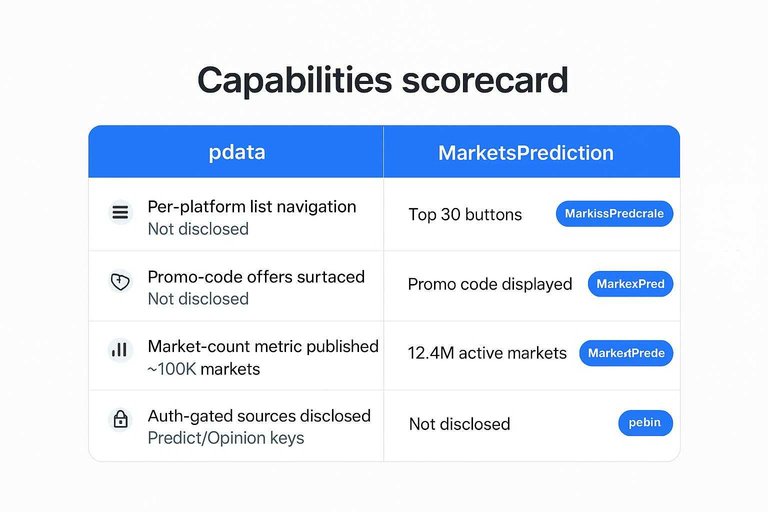
Capabilities scorecard
| Criterion | pdata | MarketsPrediction | Edge |
|---|---|---|---|
| Per-platform list navigation | Not disclosed | “Top 30” buttons | MarketsPrediction |
| Promo-code offers surfaced | Not disclosed | Promo code displayed | MarketsPrediction |
| Market-count metric published | ~100k markets | 12.4M active markets | MarketsPrediction |
| Auth-gated sources disclosed | Predict/Opinion keys | Not disclosed | pdata |
Freshness and retention
“Fresh enough” is a policy question, not a vibe. You’re deciding how frequently you can trust the numbers to change, and what you can still fetch after an event closes. MarketsPrediction at least surfaces freshness as a “Last updated” timestamp (for example: August 31, 2026 at 12:32 PM UTC), which is often enough for human-in-the-loop scanning across platforms—but it’s still different from a disclosed, enforceable update policy.
Cadence facts
pdata discloses that it polls upstream APIs every 10–40 minutes and records a per-market snapshot every 30 minutes; the scanner UI surfaces a “Last updated” timestamp (example shown: August 31, 2026 at 12:32 PM UTC).
| Product | Update cadence | Snapshotting | Freshness signal |
|---|---|---|---|
| pdata | 10–40 min polling | 30-min snapshots | Policy disclosed |
| MarketsPrediction | Timestamped UI | Not disclosed | “Last updated” |
If you need “what changed since yesterday,” snapshots are the difference between auditability and guesswork.
History limits
Retention rules matter most when markets resolve, because that’s when “the API still works” stops being guaranteed.
- Polling is 10–40 minutes per source.
- Snapshot is recorded every 30 minutes.
- Closed events drop from live tables after 10 days.
- The same event URL returns a tombstone object.
Winner: timeliness
On transparent cadence and reconstructable recent history, pdata has the clearer, decision-grade policy. It spells out both the 10–40 minute upstream polling and the every-30-minutes snapshots, so you can reason about what “current” means.
The tradeoff is explicit too: once an event has been closed for more than 10 days, the live object is removed and the URL returns a tombstone, so long-horizon history requires you to store what you need while it’s still live.
Use-case fit
Match your workflow to the cadence and the “what disappears after close” rule.
- HFT / streaming: neither.
- Daily scanning: MarketsPrediction’s comparison UI.
- Weekly reporting: either.
- Backtests: pdata, if you archive snapshots.
Match quality checklist
Cross-platform price differences are only actionable after you confirm you’re comparing the same contract. Most “matching” failures aren’t math problems; they’re spec problems hidden behind similar titles. Use this checklist to turn a tempting comparison into a verified pair you’d actually trust.
Common mismatch modes
Automated matching breaks in predictable ways, and the costs show up at resolution.
- Different wording for the same headline topic
- Different resolution criteria or sources
- Different close times or lock rules
- Binary contract vs multi-outcome field
- “Top 30” subset vs full catalog
Verify before trading
Run this every time before you treat a cross-platform gap as “real.”
- Open the original market pages on each platform.
- Compare the resolution rules line-by-line, not the market title.
- Confirm close time, last-trade time, and any early-lock conditions.
- Map outcomes explicitly (including “Other” or multi-choice structures).
- Only then treat price differences as actionable and size risk accordingly.
Tooling assists
Use tools for candidate generation and fast scanning, then verify on the source pages.
| Assist | Signal | Use | Failure mode |
|---|---|---|---|
| Best Spread callout | “Kalshi 4¢” | Prioritize venue | Mis-matched contract |
| Buy Yes/No links | Click-through context | Open source market | Wrong outcome mapping |
| pdata similar events | Nightly equivalents | Generate candidates | False-positive similarity |
| Platform “Top 30” | Limited market list | Fast browsing | Coverage bias |
Winner: workflow
For fast human verification, MarketsPrediction is the better flow because it’s built for scanning and click-through execution context, including “Best Spread” callouts and direct “Buy Yes/Buy No” links. pdata is the better choice when you want to generate and manage lots of candidate matches programmatically (for example via “similar events”) and then run your own review pipeline.
Volume isn’t one number
Cross-platform “top by volume” rankings only work if everyone is counting the same thing. In prediction markets, volume is a convention: change the convention, change the leaderboard.
Two volume camps
Most disagreements come from people answering different questions with the same label.
One camp treats volume as notional: contracts traded × $1 face value, which is easy to aggregate but can look “too big” if you expected cash. The other camp tries to approximate cash actually exchanged, and numbers diverge again when trackers count both sides/legs of a trade differently, or when they roll up mixed units (USD venues next to play‑money venues). A recurring flashpoint is whether it’s valid to convert Manifold “mana” volume into a USD-equivalent for cross-venue composites: one camp keeps it in MANA (or excludes it from USD totals) because it’s play money; the other converts using a conservative mapping but discloses the conversion so readers can discount it.
pdata handling
pdata closes the gap by stating its conventions in its methodology.
- Passes platform-reported 24h notional volume for seven sources
- Recomputes Limitless 24h volume from snapshot deltas
- Does no unit normalisation across sources
- Excludes Manifold from the USD stack chart (mana is play money)
MarketsPrediction handling
MarketsPrediction presents volume as a browsing and comparison signal, not a normalized research metric.
- Publishes a “Weekly Notional Volume” headline figure ($5.3B)
- Ranks “Top Markets By Volume” for fast scanning
- Offers per-platform “Top 30” volume views
Winner: methodology
For cross-platform rankings you can reproduce, explicit definitions beat prettier totals. pdata is the clearer reference because it publishes the decision points that usually cause “volume comparability” fights: when a venue has no 24h field (Limitless), it recomputes from snapshots rather than leaving a blank, and when units aren’t comparable (Manifold’s mana), it refuses to blend them into a USD stack chart.
That transparency is what lets you align your leaderboard with the question you’re actually asking.
Developer data access
MarketsPrediction helps you form better questions fast because the product is a browsing surface: per-platform “Top 30” controls (Plus500, Kalshi, Polymarket, Foregate) and a promo-code block that displays “MARKETSPREDICTION” alongside eligibility/risk language (“Must be 18 years or older… legal, U.S. residential address… Trading involves risk.”) are first-class UI elements. pdata is the opposite: it’s built for getting answers into code, with public interfaces you can script and rerun. If your goal is “question → query → reproducible output,” the workflows below are the difference.
REST workflow
- Start from the published OpenAPI, so your client stays schema-driven.
- Call the public endpoints directly from your script or notebook.
- Pull events, markets, and history ranges into versioned raw files.
- Store the payloads alongside attribution/citation fields for reuse.
SQL workflow
- Copy the public read-only Postgres connection string into your tooling.
- Connect as the constrained read-only role on the curated table subset.
- Query the curated tables as your “source of truth” for analysis.
- Join normalized tables, then compute your own rollups from stored records.
Agent workflow
- pdata exposes an MCP server over HTTP.
- It negotiates the MCP spec revision your client proposes.
- It lists support for 2024-11-05, 2025-03-26, and 2025-06-18.
- Best for agent retrieval when you don’t want to manage API keys.
Winner: automation
For programmatic access you can run in CI or scheduled pipelines without accounts or keys, pdata wins: REST + an MCP endpoint + a published read-only Postgres URL with a “never rotating” connection string make the path from question to rerunnable output short.
MarketsPrediction is still the better pick when your bottleneck is deciding what to investigate, because its UI is built for fast cross-platform scanning rather than being a data interface.
Pick the source that matches your rights and workflow
Choose MarketsPrediction when your priority is fast, human-first scanning: finding what’s trending, comparing cross-platform odds and activity, and clicking through to the venue to verify specs and trade. Choose pdata when your workflow requires automated collection and downstream reuse—MarketsPrediction’s Terms grant a personal, non-commercial license and explicitly prohibit automated scraping/bulk extraction and reproducing or redistributing the site’s data/comparisons to build or feed another product or dataset. If you’re building anything that needs to run unattended or publish a derived feed, make the “reuse rights” section your first stop, not an afterthought.
Frequently Asked Questions
- Does pdata provide full prediction-market coverage, or can it break if a platform changes access?
- pdata’s own methodology notes that Predict and Opinion are auth‑gated, with API keys held server-side, and coverage depends on those keys remaining valid. If the keys expire or access changes, those sources can drop out until access is restored.
- What is Model Context Protocol (MCP) in prediction market data access, and why would I care?
- Model Context Protocol (MCP) is a standard way for tools to expose data and actions to AI assistants so an LLM can query them in a structured, auditable workflow. You care when you want a chatbot/agent to pull prediction market data without custom glue code for every source.
- When should I use Server-Sent Events (SSE) instead of polling for prediction market odds?
- Use Server-Sent Events (SSE) when you need a continuous one-way stream of updates from a server to your client and want the server to push changes as they happen. Use polling when you only need periodic snapshots and can tolerate checking on a schedule.
- How can I connect an LLM toolchain to a read-only Postgres market dataset without writing a custom integration?
- Use an MCP bridge such as mcp-remote to connect your client to an MCP server, and a Postgres-focused MCP server like crystaldba/postgres-mcp to expose the database to the model as queryable tools. This setup lets you run structured queries through the MCP interface rather than hand-rolling a connector.
- If I’m just trying to find where the best prices are right now, do I need an API at all?
- No—if your goal is manual scanning and quick cross-platform comparison, a browsing surface is the faster path than building ingestion. Use MarketsPrediction to compare live odds across platforms (for example Trendle), then go to the venue you prefer to place the trade.