
 Best Platforms
 Live Odds







Primary in US Odds Tracking: Bid/Ask, Liquidity, Calendar
Track primary in US odds with tradable bid/ask snapshots, spread+size, venue access labels, and primary/runoff/certification dates plus resolution rules.
You’re trying to keep a clean read on who’s ahead in a U.S. primary, but the “odds” you see don’t behave like a stable number. They jump, stall, or flip on a single trade—especially when a market is thin or the contract’s definition isn’t the one you assumed.
If you track the wrong outcome, the wrong timestamp, or a price you couldn’t actually trade, you can end up reacting to phantom moves and misreading what the market is saying. This guide gives you a repeatable 7-step workflow: define the contract, align it to the election calendar, choose eligible venues, log best bid/ask and liquidity, filter weak signals, and verify results after the fact.
Define the contract
Before you track any “primary in US” odds, lock down what the contract is actually paying out on. An event contract—a derivative whose payoff depends on a specified event outcome (often yes/no), typically with a fixed payout at settlement—is only as clear as its outcome sentence and its written resolution rules. The CFTC describes these markets as fixed-payout, yes/no contracts (often $1) whose prices reflect what traders think will happen, with real-time bid and ask prices in the order book (see the CFTC’s overview of prediction markets and event contracts). If you skip this step, your chart becomes a mash-up of different definitions of “win.”
Step 1: Pick outcome
Write the outcome you’re tracking as one sentence that every venue can map to.
- Primary winner: “Candidate X wins the [party] primary election in [state/district].”
- Runoff-trigger: “No candidate reaches the threshold, so a runoff is required.” A runoff—a follow-on election (often weeks later) required in some states if no candidate meets a threshold—can make “winning the primary” a two-stage story.
- Nominee: “Candidate X becomes the party’s nominee for the general election.”
Pick one and stick to it. Otherwise you’ll compare a “wins tonight” contract to a “wins after the runoff” contract and call it market disagreement.
Step 2: Save resolution rules
Copy the contract’s resolution language into your tracker verbatim, then record these fields next to your odds series.
- Resolution source: Which feed or authority decides it (and whether it’s a media call or an official process).
- Cutoff timing: The exact time/date and timezone that matter for determining the outcome.
- Outcome procedure: Any review/appeal language. For example, Kalshi’s rulebook describes a Market Outcome Review Process where an Outcome Review Committee aims to decide the final outcome within 24 hours after review is initiated, and says outcomes are posted by 11:59 pm ET on the day they’re determined.
- Display vs tradable reminder: Don’t let a UI number stand in for the contract. Polymarket says it displays the midpoint of the bid-ask spread—unless the spread is over $0.10, when it switches to the last traded price.
Once those identifiers and rules are saved, your “odds” time series actually means one thing—and you can defend every spike later.
Anchor to calendar
A primary market only makes sense when it’s pinned to the election’s real-world timeline—including certification, the official post-election process that finalizes results (and contract settlement may reference certified outcomes, not a media call).
- Add three date fields per market. Primary Election Day, any runoff date, and a certification window (start/end or at least the expected certification date).
- Pull the primary/runoff dates from an official calendar. FVAP publishes a primary election calendar that lists state primary dates and primary runoff dates (if applicable).
- Track certification as a separate phase, not a footnote. The Associated Press notes results update in real time on election night and in the days after, until state officials certify results as final.
- Prefer state-posted certification schedules when you can get them. South Carolina’s 2026 schedule is explicit: Primary Election Day is June 9, 2026; county certification is June 11; state certification is June 12. If there’s a runoff, it’s June 23, with state certification on June 26.
- Build a watchlist schedule around those anchors. Set checkpoints for pre-primary (lead-up), election night (live updates), and the post-election certification window—then label anything “final” only after the last relevant certification date (including any runoff).
Choose eligible venues
A “US primary odds” tracker only works if every price you log is something you can actually trade. That means your sheet needs two labels per venue: access (can you legally use it from the U.S.?) and regulatory status (is it a registered U.S. venue?), because liquidity is not proof of either.
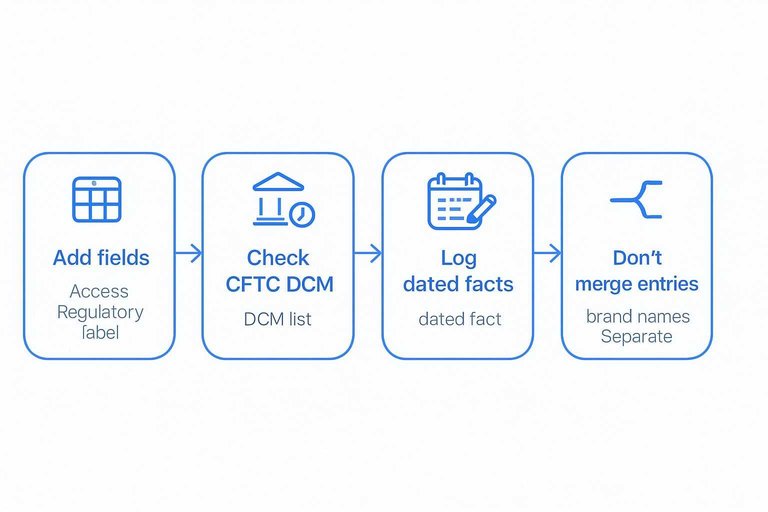
Step 4: Verify access
- Add two fields to each row: Access (US-ok / US-blocked) and Regulatory label (CFTC DCM / not listed).
- Verify the venue on the Commodity Futures Trading Commission (CFTC) Designated Contract Market (DCM) list (a DCM is a CFTC-designated exchange).
- Log what you find as a dated fact in your tracker. The CFTC list shows Kalshi as Designated on 11/03/2020, and notes that on January 17, 2025 the Commission granted Kalshi’s petition to modify its Order of Designation to permit intermediated futures trading.
- Do the same check for each U.S.-facing brand name. The list shows QCX LLC d/b/a Polymarket US as Designated on 07/09/2025.
- Don’t merge “looks like the same site” entries. Polymarket’s terms say trading is blocked in the U.S. on polymarket.com and directs U.S. users to polymarket.us; they also state Polymarket US is operated by QCX LLC d/b/a Polymarket US (a CFTC-regulated DCM), while the international platform is not CFTC-regulated and operates independently.
MarketsPrediction watchlist
- Use MarketsPrediction to scan primary-related markets across platforms by implied odds, volume/liquidity, and the page’s “Last updated” freshness timestamp.
- Filter by platform so you’re comparing like-for-like access (your “US-ok” venues together).
- Click through to the underlying venue before you log a price, so your tracker stays anchored to tradable quotes—not an aggregator display.
If you already know the exact venue and contract you’ll trade, skip the aggregator and go straight to the venue you’ve verified.
Record tradable odds
Displayed “odds” are often a convenience number chosen by the UI. Your tracker should instead log what you could actually trade right now: the executable best bid and best ask from the order book (plus their sizes).
An order book (CLOB)—the live list of resting buy/sell orders at different prices—is where those tradable quotes live. Best bid / best ask are the single most favorable prices currently available to sell into (bid) or buy from (ask), and the bid-ask spread is the gap between them.
This distinction matters because some venues explicitly display a non-executable “headline” price. For example, Polymarket’s Help Center says the probability it displays is the midpoint of the bid-ask spread, unless the spread is over $0.10, in which case it displays the last traded price instead. That means a time series built from the UI can record a number you cannot “hit or lift” at that moment—or even a number that’s stale relative to current quotes. (See: https://help.polymarket.com/en/articles/13364488-how-are-prices-calculated)
Step 1: Snapshot the book, not the headline
At each timestamp, pull the top-of-book for both outcomes (YES and NO): the best available price and its size.
If you’re pulling from Kalshi’s Trade API, the order book response is an orderbook_fp object with yes_dollars and no_dollars arrays where each level is [price_dollars, count_fp] (both as strings). You’re after the first level in each array. (See: https://docs.kalshi.com/getting_started/orderbook_responses)
If you’re pulling from Polymarket, don’t rely on the “probability” shown on the market page as your logged price. Treat it as a display field, and source your tradable quote from the CLOB (best bid and best ask) so your record always reflects executable levels—especially when spreads are wide enough to trigger Polymarket’s $0.10 last-trade display rule.
Step 2: Reconstruct the missing side (when an API is “bids-only”)
Some endpoints return bids only, not asks. Kalshi’s order book endpoint is documented this way, and Kalshi documents the reciprocal relationship you can use to recover the other side in binary markets. (See: https://docs.kalshi.com/getting_started/orderbook_responses)
Concretely, if you have bids for both outcomes you can reconstruct the executable asks:
- YES bid at price X is equivalent to a NO ask at $1.00 − X
- NO bid at price Y is equivalent to a YES ask at $1.00 − Y
Two implementation notes that prevent common tracker mistakes:
- Don’t label a UI midpoint as “best ask.” If your endpoint is bids-only, your “ask” fields should come from reciprocity (as above), not from a displayed midpoint or last trade.
- Always keep the side straight: “best YES ask” is the price you would pay to buy YES now. Under bids-only + reciprocity, that comes from the best NO bid (because buying YES is equivalent to selling NO).
Step 3: Normalize price to implied probability
Implied probability is probability read directly from price (for a $1 payout, 0.63 ≈ 63%).
On Polymarket, outcome shares are priced from 0.00 to 1.00, and each winning share pays $1.00 USDC at resolution (with each YES+NO pair fully collateralized by $1.00 USDC). (See: https://help.polymarket.com/en/articles/13364060-what-is-polymarket)
On Kalshi, a “Yes” price of p cents is commonly interpreted as about p% market-implied probability, with the standard binary payoff: a “Yes” contract pays $1 if the event happens and $0 otherwise. (See: https://news.kalshi.com/p/how-to-read-probabilities)
So store bid/ask as both raw price and implied probability (often the same value expressed differently), but keep them tied to bid and ask specifically—not a midpoint or last-trade display.
Step 4: Store the spread as a first-class field
Compute and store:
best_yes_bid,best_yes_askbest_no_bid,best_no_askyes_spread = ask − bid(and/orno_spread)
On Kalshi, the minimum quote increment per contract is $0.01, so spreads will move in clean cents—use that to sanity-check parsing and reciprocity math. (See: https://www.cftc.gov/sites/default/files/filings/orgrules/24/11/rules1114248723.pdf)
Also consider storing a separate “displayed” field if you show UI headline odds in your product—but keep it distinct from tradable quotes. In particular, on Polymarket the displayed value may be a midpoint, and when the spread exceeds $0.10 it may switch to last trade instead; either way, the spread you compute from the book is what tells you whether the headline move is actually tradable. (See: https://help.polymarket.com/en/articles/13364488-how-are-prices-calculated)
Step 5: Write one “tradable quote” row per snapshot
Persist a row that’s unambiguous later: timestamp (with timezone), venue, market/contract id, best bid/ask (YES and/or NO), sizes, implied probabilities, and spread.
If you only remember one rule: your time series should be executable, not aesthetic—for “primary in US” tracking, bid/ask (and the spread between them) is how you tell a real price from a display convention.
Filter weak signals
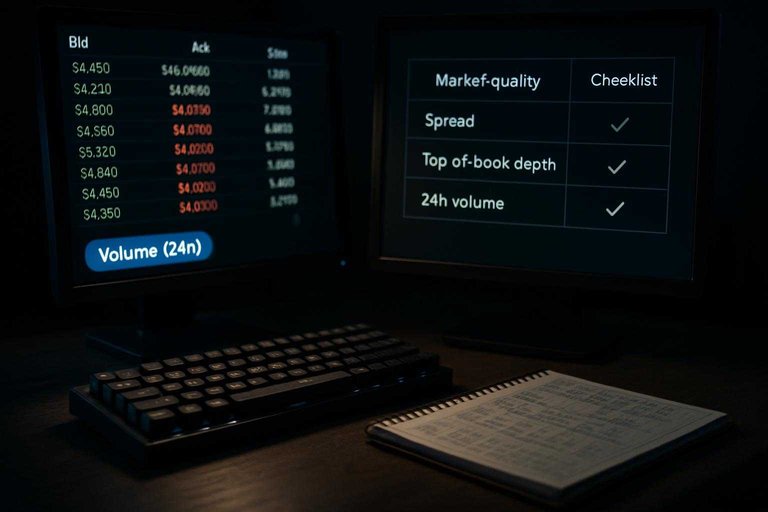
A one-cent move can be a microstructure artifact if the quote isn’t really tradable. Before you react to any primary in US price change, grade each snapshot for market quality using the same fields you’re already logging: whether there’s a two-sided top-of-book, how wide the spread is, and how much size is actually available at the best prices.
Use Volume (24h)—how much has traded recently (a quick activity proxy, but not the same as current liquidity)—and open interest—the amount of outstanding positions/contracts (a proxy for how established a market is)—as your two fast “is this market alive?” checks.
| Quality check | Measure (from your snapshot) | Low-quality flag | What you do next |
|---|---|---|---|
| Spread discipline | Bid-ask spread | Over your preset cap | Down-rank; ignore small moves |
| Two-sided book | Best bid/ask exist | One side missing | Treat odds as display-only |
| Top-of-book depth | Size at best prices | Tiny size | Require confirmation snapshots |
| Volume (24h) | Recent traded amount | Near-zero | Don’t chase single prints |
| Open interest | Outstanding contracts | Minimal | Prefer other venues first |
If you also track an external results feed (for example, the AP Elections API), keep it as a separate timestamped column—don’t let a late update trick you into treating a weak market move as “news.”
Verify and post-mortem
After each “primary in US” market resolves, close your log by saving the handful of fields that let you audit (a) what the market priced and (b) when the contract actually became final.
- Lock the cycle key. Add a stable label like
cycle=2026, so you can compare primary cycles without guessing later. - Capture the “official truth” row. When the results authority your contract names publishes the decisive outcome, paste the link/title you used, plus the timestamp you read it.
- Reconcile market vs outcome. Record the final winning side (YES/NO) and your last tradable bid/ask snapshot before the outcome became clear. Also keep two timestamps: when the market effectively priced the outcome as near-certain and when the official process actually finished—because results can keep updating for days after Election Day until officials certify them as final (as the AP notes in its explainer on how AP counts the vote).
- Track Market Outcome Review. If the venue flags a Market Outcome Review—its formal process for reviewing/confirming an outcome before settlement when something could affect the reliability of the underlying source—log start time, reason text, and status changes.
- Measure settlement timing. Record when the contract actually settles, and compute
time_to_settlefrom your confirmation timestamp.
That last timing field is what keeps your next cycle’s charts comparable, even when settlement gets messy.
Treat odds as tradable quotes
If you want a clean read on who’s ahead, stop tracking a single headline percentage and start tracking what the market actually offers: best bid/best ask, the spread, and the size behind those quotes—tied to the contract’s resolution rules and the primary/runoff/certification timeline. That’s how you tell a real repricing from a thin-book flicker or a UI display convention. Your first move is simple: pick one outcome sentence, paste the resolution language next to it, then log one top-of-book snapshot with a timezone and a spread field. Use an aggregator to quickly find where the action is and compare venues, but record prices only after you’ve clicked through to a venue you can access and verified the contract you’re charting is the one that will settle.
Frequently Asked Questions
- Is “primary in US” odds tracking the same thing as tracking Polymarket.com odds from the United States?
- No—Polymarket’s terms say trading is blocked in the U.S. on polymarket.com and directs U.S. users to polymarket.us, which is a separate, CFTC-regulated venue. If your “primary in US” tracker mixes U.S.-blocked and U.S.-ok platforms without labeling them, the odds won’t be comparable as tradable prices.
- If a race is called on election night, why do “primary in US” markets still matter until certification?
- Because official results can keep changing until state certification, and contracts can resolve on that official process rather than an election-night call. For example, South Carolina’s 2026 primary is June 9 with state certification on June 12, and a runoff (if needed) is June 23—so “final” has a real calendar lag.
- What should I log for “primary in US” odds if I want prices I can actually trade (not a headline percentage)?
- Log the best bid and best ask (top-of-book) for YES and NO at each timestamp, plus the size available at those prices. On Kalshi, you can pull this from the Kalshi Trade API order book response and store it alongside your timestamp and market id.
- Can I use a last-traded price instead of bid/ask when tracking “primary in US” markets?
- Use bid/ask for tradability: the last trade can be stale while the current best bid and best ask show what you can execute right now on a CLOB. If you must store last trade, keep it as a separate field so it doesn’t overwrite executable quotes.
- How do I quickly find which platform has the most liquidity for a specific “primary in US” market before I start logging snapshots?
- Start with a cross-platform scanner that shows per-platform odds plus activity fields like volume and liquidity, then click through to the underlying venue to confirm the order book and contract details. MarketsPrediction is built for this first-pass comparison with platform filters and “last updated” freshness timestamps.